
Kitchen design import to ERP accounting software is vital for modern businesses striving to improve accuracy and efficiency. Linking tools like 2020 Design with systems like NetSuite and QuickBooks allow kitchen cabinet businesses to eliminate manual data entry, reduce errors, and save valuable time. This integration ensures that detailed design data flows seamlessly into accounting and ERP systems, enabling better inventory management, streamlined sales order processing, and precise financial tracking. Explore how streamlining kitchen design imports into NetSuite, QuickBooks, and similar systems can transform your operations and help you achieve more with less effort.
Challenges in Importing Kitchen Designs
Manually importing kitchen design data into ERP and accounting systems presents numerous challenges.
1. Error-Prone Manual Entry
Transferring complex design data by hand often leads to mistakes, such as incorrect pricing, missing details, or inaccurate order specifications. Each error can have cascading effects, disrupting operations and causing delays. These inaccuracies can erode trust with customers, negatively affecting their overall experience. Automation is critical in minimizing these risks and ensuring consistent accuracy.
2. Time-Consuming Processes
Manual data entry requires significant time and attention to detail, diverting resources away from critical tasks like client engagement. The inefficiency often results in slower order fulfillment, which can delay project timelines and affect customer satisfaction. By streamlining the process with integration tools, businesses can free up valuable time for strategic activities and reduce turnaround times.
3. Difficulty in Syncing Large Design Files
Kitchen designs created in 2020 Design are inherently complex, containing detailed specifications and large data volumes. Syncing such extensive files with ERP systems like NetSuite or QuickBooks can be challenging without dedicated tools. Poor synchronization may lead to incomplete data transfer, further complicating inventory management and financial reporting.
4. Lack of Real-Time Updates
Without automation, it’s nearly impossible to maintain real-time accuracy for inventory levels, sales orders, and financial records. This lack of visibility can result in overstocking or stockouts, disrupting operations and increasing costs. Real-time synchronization ensures that all departments work with the latest data, enabling informed decision-making and efficient resource allocation.
Addressing these challenges requires robust integration solutions that simplify data transfers while maintaining accuracy and efficiency.
Benefits of Integration
Streamlining kitchen design import to the ERP process offers numerous advantages.
Faster Sales Order Processing
Automatically converting design data into sales orders saves time by reducing manual entry tasks. This speeds up the entire order-to-delivery cycle, allowing businesses to serve customers more efficiently. Faster processing also enhances customer satisfaction by ensuring timely deliveries.
Improved Data Accuracy
Automation minimizes human errors, ensuring that all design details and financial data are transferred accurately. With fewer mistakes, businesses can maintain consistency across operations and avoid costly corrections. This level of precision builds trust with customers and strengthens operational reliability.
Enhanced Inventory Management
The integration provides real-time inventory updates, helping businesses maintain optimal stock levels. Accurate syncing prevents issues like overstocking, which ties up capital, or understocking, which can delay projects. With better visibility, businesses can forecast demand and manage resources effectively.
Streamlined Financial Tracking
Syncing design data with accounting systems ensures accurate cost tracking and billing. Automation allows for real-time profit analysis, enabling businesses to make informed financial decisions. This streamlined approach also simplifies tax reporting and compliance.
Better Collaboration
Teams can access unified data, improving communication and coordination between design, sales, and accounting departments. By working with consistent information, each team can contribute more effectively to project success. This collaboration reduces misunderstandings and enhances overall productivity.
Reduced Administrative Workload
Automating repetitive tasks frees up employees to focus on strategic initiatives and customer engagement. Reducing manual work also decreases stress and increases job satisfaction among staff. As a result, teams can deliver more innovative designs and superior service.
Scalability
Integration tools grow with your business, accommodating increasing project volumes seamlessly. As your operations expand, the system can handle larger datasets and more complex workflows without additional strain. This scalability ensures long-term efficiency and supports business growth.
Step-by-Step Guide to Importing Designs with KitchenDEV
We will show you how you can complete kitchen design import to ERP – export your designs from 2020 Design, prepare data for NetSuite import, upload your design to NetSuite as a sales order, and export and import it into QuickBooks – all using one bridge application — KitchenDEV.
By following the steps below, you can transform your kitchen design import process and achieve seamless integration with your ERP or accounting systems. KitchenDEV simplifies every stage, ensuring that your design data transitions effortlessly from 2020 Design to platforms like NetSuite and QuickBooks.
Whether you’re exporting files or managing sales orders, KitchenDEV’s robust tools eliminate errors and save time. Let’s explore how each step of this process works to optimize your operations.
Exporting Designs from the 2020 Design
Here is how to complete the 2020 design import to ERP using KitchenDEV as a bridge application.
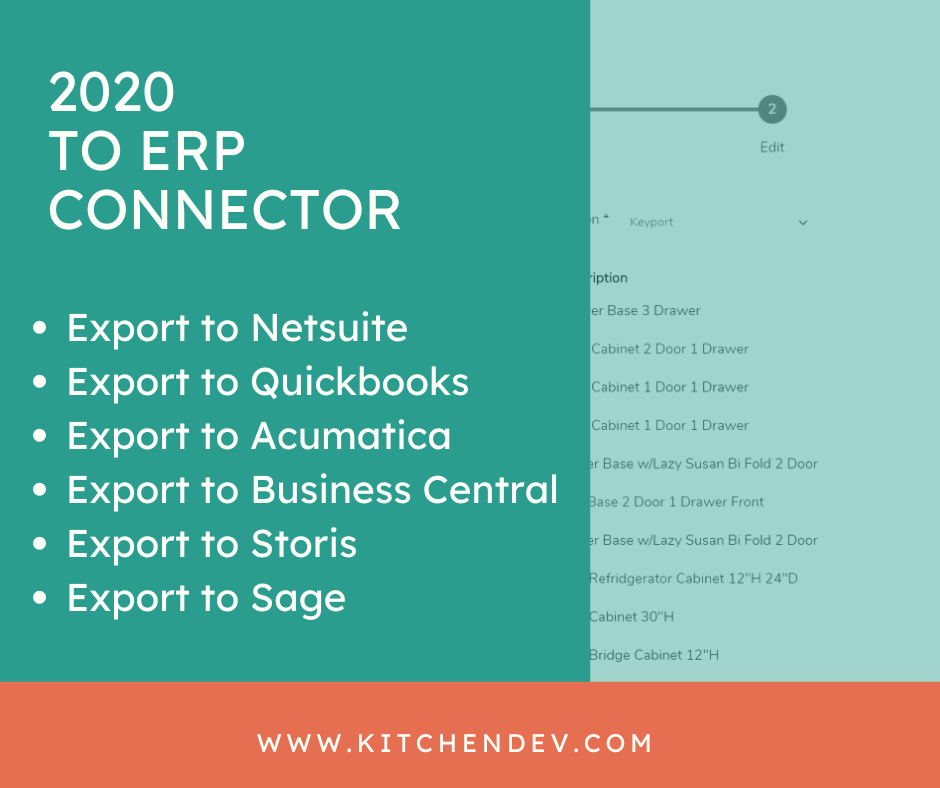
- Provide Catalog
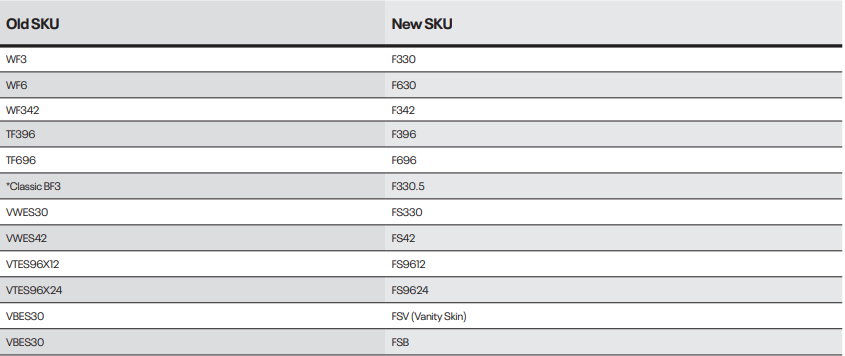
To start the 2020 design import to ERP, provide us with your SKU list and Netsuite Internal IDs in an Excel file and we will build a database for mappings. We connect to your data source including SKUs and corresponding Netsuite, internal IDs.
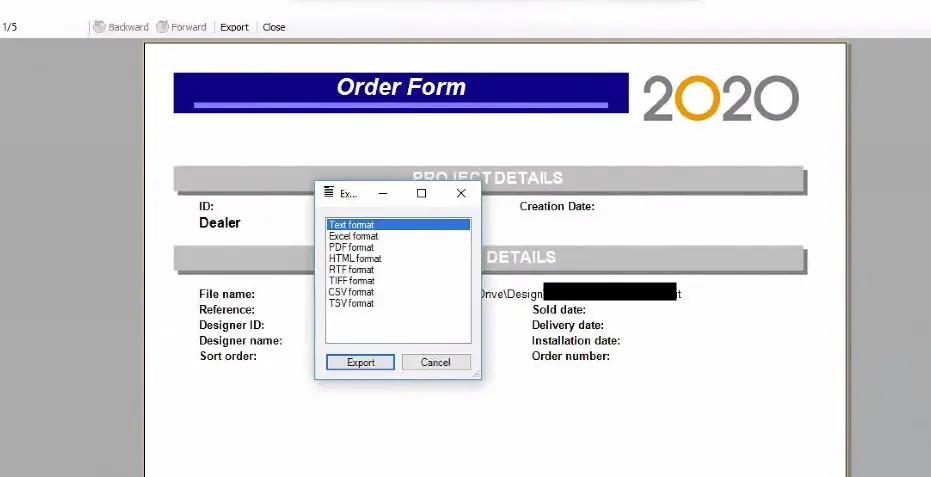
2. Export 2020 Design
Export the kitchen design you made as a text file.
Uploading to NetSuite as a Sales Order
Here is how to complete the 2020 design import to Netsuite using KitchenDEV as a bridge application.
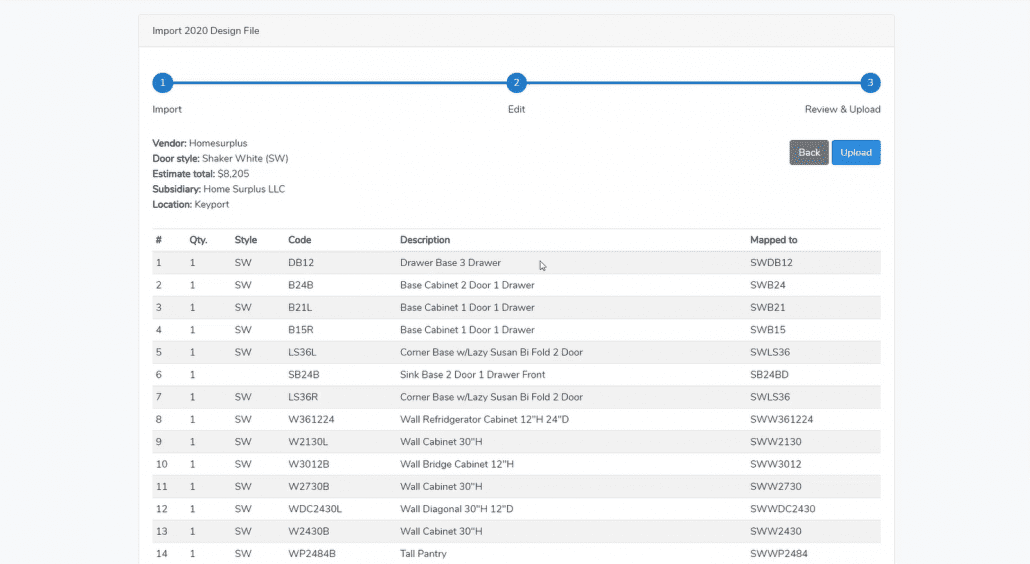
- Import and Map
To start the 2020 design import to Netsuite, import the design file into our software and train our software for SKUs that did not map.
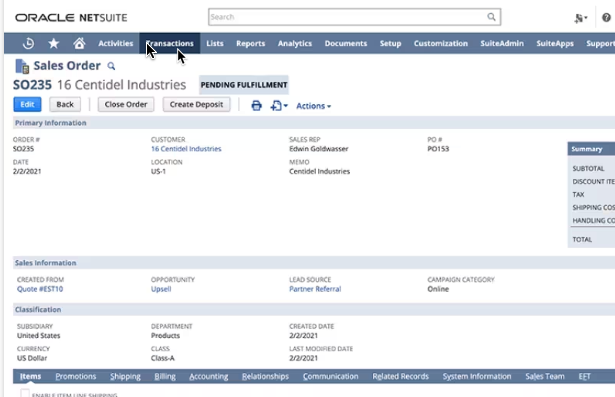
2. Export as Netsuite Sales Order
Send the design to Netsuite as a Sales Order automatically.
Exporting and importing into QuickBooks
Here is how to complete the 2020 design import to Quickbooks using KitchenDEV as a bridge application.
- First export 2020 Kitchen Design into a text file.
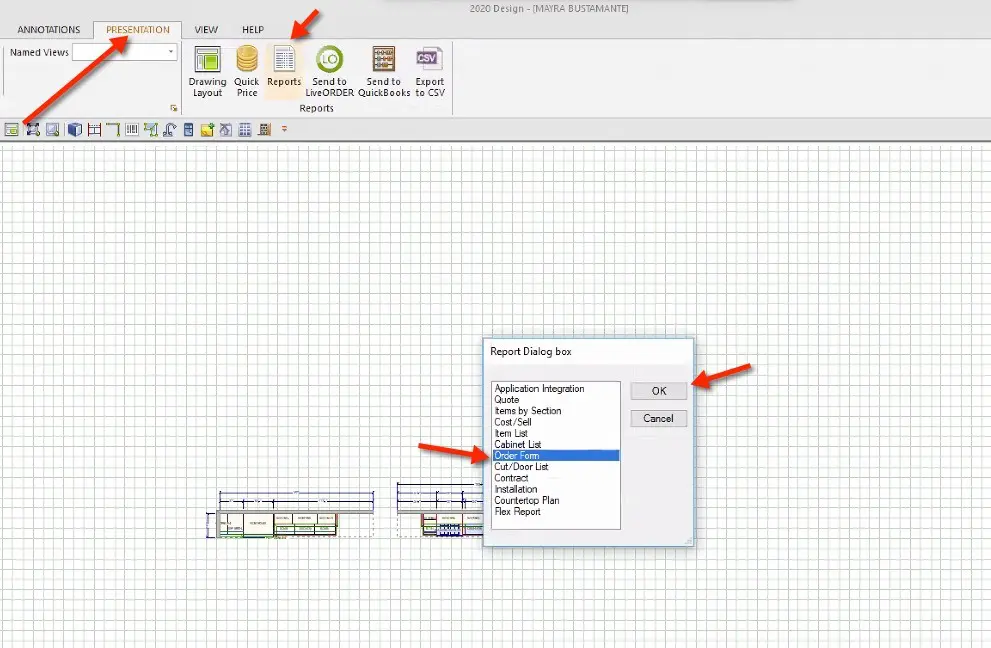
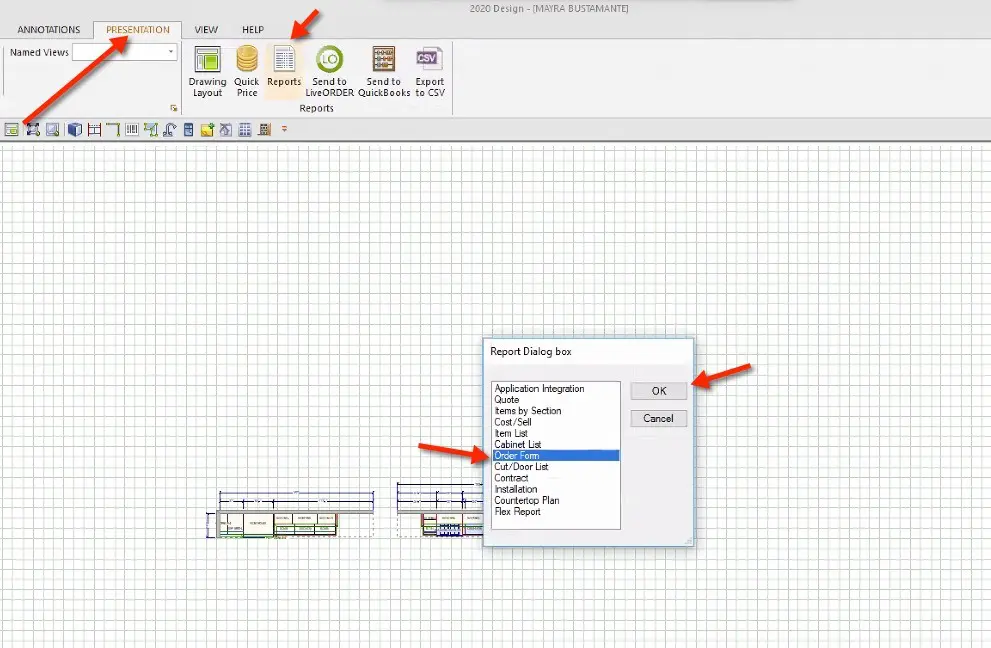
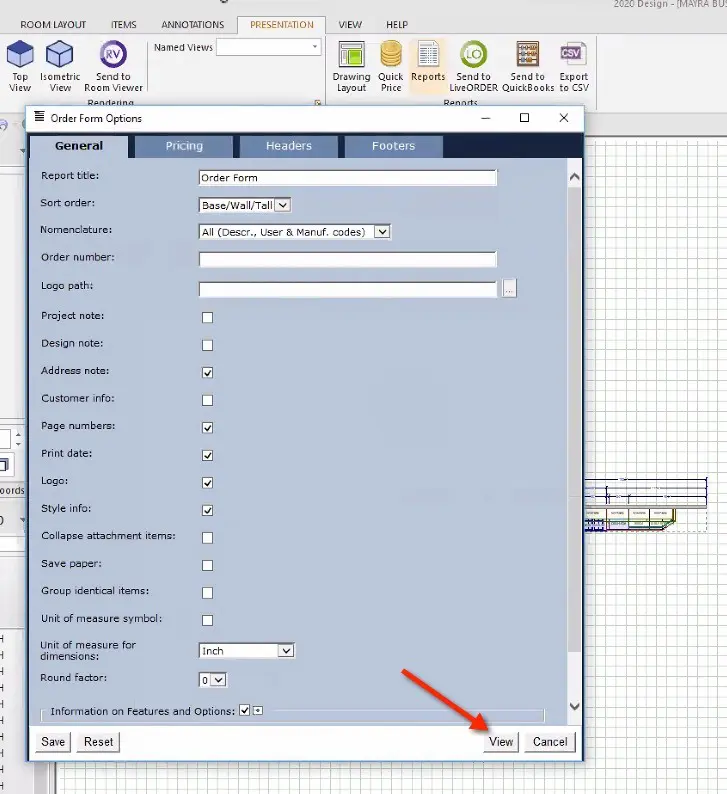
- Click on the Presentations tab on the top menu, then click on Reports, select Order Form, and click OK.
- Click on the View button in the bottom right corner, without changing any options.
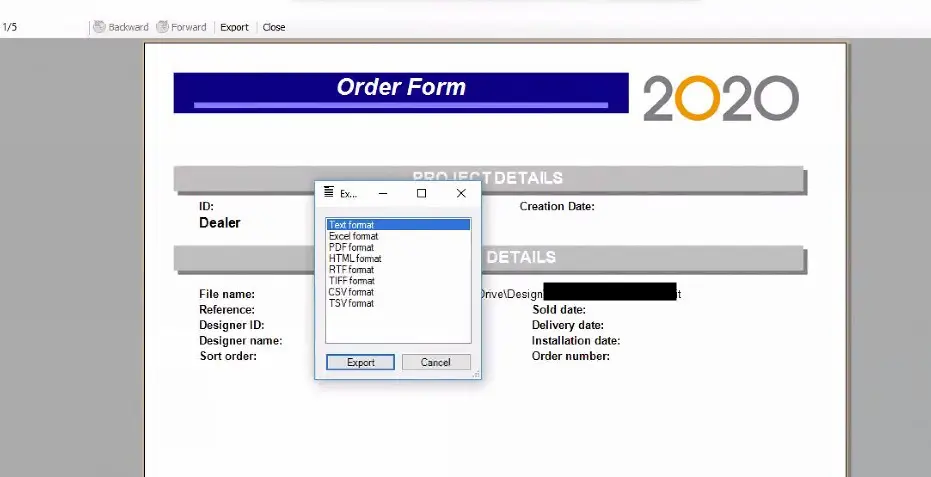
- Click on Export at the top, select Text format, and click Export.
- Go to the bridge application and upload the 2020 Design file.
- Add missing data.
- Review mappings.
- Completing export will mark the 2020 design import to Quickbooks using KitchenDEV.
Best Tools for Automation
In addition to KitchenDEV, several connectors facilitate the kitchen design import to ERP integration between 2020 Design and ERP or accounting systems.
2020 Insight
This solution offers business system integration, providing accurate, real-time data flow that interfaces with existing systems to streamline IT operations.
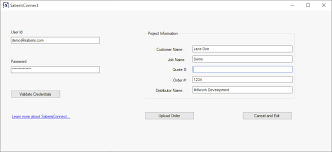
SaberisConnect
A cloud-based solution that automates integration between 2020 Design and various ERP, point-of-sale, or accounting systems, enhancing efficiency for kitchen and building material dealers.
nChannel Connectors
Pre-built and configurable connectors that integrate popular eCommerce, ERP, POS, and 3PL systems to automate business processes, potentially applicable for integrating design software with business systems.

These tools for 2020 design import to accounting systems and KitchenDEV provide various options for automating and streamlining the integration between 2020 Design and other business systems.
Features of Integration Tools
Compatibility
Kitchen design import to accounting software integration tools must support various platforms, including 2020 Design, NetSuite, and QuickBooks. This ensures seamless data transfer between design software and essential business systems, reducing the need for multiple solutions. KitchenDEV excels in providing compatibility across these platforms, making it a versatile choice for 2020 design import to accounting systems but also for diverse business needs. With this feature, businesses can confidently integrate their existing tools without worrying about compatibility issues.
User-Friendly Interface
A simple, intuitive interface is crucial for streamlining complex data mapping and transfers when working on kitchen design import to accounting software. Tools like KitchenDEV make it easy for users to configure settings and map data fields without requiring advanced technical knowledge. This reduces training time and ensures that the software can be adopted quickly across teams. By prioritizing user experience, businesses can focus on operations instead of struggling with complicated tools.
Real-Time Updates
Tools that provide real-time updates on sales orders, inventory, and financial data significantly enhance operational efficiency. With instant data synchronization, teams can make informed decisions without delays. KitchenDEV’s real-time update feature eliminates discrepancies and ensures that all departments are working with the most current information. This capability is vital for maintaining a responsive and agile business.
Customizable Workflows
Every business has unique processes, and integration tools for kitchen design import to accounting systems must accommodate these differences. KitchenDEV allows users to tailor workflows to their specific needs, offering flexibility that other tools may lack. This customization ensures businesses can optimize their operations without compromising existing practices. By adapting to unique workflows, KitchenDEV empowers companies to achieve greater efficiency and productivity.
KitchenDEV’s CPQ and B2B software is a leading solution for automating kitchen design imports, offering unparalleled efficiency and reliability.
Best Practices for Error-Free Imports
Regarding conducting error-free kitchen design import to accounting software, KitchenDEV is the safest and most reliable solution. With its intuitive interface and step-by-step instructions, businesses can easily follow the process without requiring specialized training. KitchenDEV ensures that every detail, from design specifications to financial data, is accurately imported, saving time and reducing errors.
1. Ensuring Data Accuracy
Verify all design details before exporting, including pricing, dimensions, and material specifications. KitchenDEV simplifies this process with validation tools that check for discrepancies before transferring the data.
2. Validating Data Post-Import
After importing, review the sales orders and financial entries in your ERP or accounting system. KitchenDEV makes this step seamless by providing automated reports that highlight any inconsistencies, ensuring complete accuracy.
3. Regular Updates and Maintenance
Keep KitchenDEV updated to benefit from the latest features, security patches, and integrations. KitchenDEV’s automated update notifications and dedicated support ensure your system runs smoothly.
Schedule routine maintenance with KitchenDEV’s tools to identify and resolve potential issues proactively, avoiding disruptions to your workflow. With KitchenDEV, businesses can achieve error-free imports effortlessly, making it a premium solution for kitchen design integration needs.
Case Study: How Europly Optimized Workflow with 2020 Design & QuickBooks Integration by KitchenDEV
The Challenge
Europly, a cabinetry and woodworking company, struggled with inefficiencies in order management and financial processing. Kitchen designs created in 2020 Design had to be manually entered into QuickBooks, leading to errors and delays. Dealers lacked a structured catalog and an easy way to generate quotes, while manual pricing and order submissions via email or fax slowed operations. Additionally, collecting payments was cumbersome without an electronic system. Europly needed an integrated solution to streamline its workflow.
The Solution: KitchenDEV’s Seamless Integration
By implementing KitchenDEV’s 2020 Design and QuickBooks integration, Europly transformed its business operations. Key features included:
✅ Automatic Data Sync – Kitchen designs from 2020 Design were automatically converted into itemized orders and synced with QuickBooks, eliminating manual data entry.
✅ Dealer-Friendly Digital Catalog & Quoting – Allowing dealers to browse, customize, and generate quotes with ease.
✅ Electronic Order Submission – Enabling direct, error-free digital order processing.
✅ Automated Pricing & Order Management – Reducing pricing discrepancies and ensuring accuracy.
✅ CardKnox Online Payment Integration – Simplifying and accelerating dealer payments.
✅ Custom Branding Features – Enhancing brand identity with a professional interface.

The Results
Since integrating KitchenDEV, Europly has:
✔ Reduced order processing time by 40% through automation.
✔ Eliminated manual entry errors by seamlessly linking 2020 Design and QuickBooks.
✔ Improved dealer experience with a structured catalog and streamlined ordering.
✔ Enhanced pricing and order accuracy, minimizing discrepancies.
✔ Accelerated payment collection with secure online transactions.
✔ Strengthened brand presence with custom branding.
What Europly Says
“KitchenDEV has revolutionized how we handle orders, payments, and finances. The 2020 Design and QuickBooks integration made our workflow incredibly smooth, allowing us to focus more on our customers while the system takes care of the rest.” – Europly Team
Takeaway
By leveraging KitchenDEV’s 2020 Design and QuickBooks integration, Europly achieved a seamless, automated workflow, eliminating inefficiencies and boosting productivity. If you’re looking to optimize your cabinetry business, KitchenDEV is the ultimate solution!
Conclusion
Kitchen design import to ERP accounting systems is a game-changer for businesses seeking efficiency, accuracy, and scalability. KitchenDEV simplifies this integration with its robust CPQ and B2B features, ensuring that your data flows seamlessly between platforms like 2020 Design, NetSuite, and QuickBooks. With KitchenDEV, you can reduce errors, automate time-consuming processes, and improve collaboration across teams. This powerful tool not only enhances operational workflows such as kitchen design import to accounting systems but also supports business growth by accommodating increasing volumes and complexities.
Don’t let outdated processes hold you back. Embrace KitchenDEV’s premium integration capabilities and transform your business operations. By taking the next step towards automation, you can elevate your service quality, meet customer expectations, and achieve long-term success.
