
Manually processing orders from customers is stressful, impractical, time-consuming, and can potentially result in expensive errors. Standard manual processing provides little to no insight into the sales order chain, which makes the operation inefficient. Using the right order entry software offers an effective view of data on sales orders from all of your sales channels. This offers greater transparency and control of your insights and sales order cycle. With a streamlined and automated process, you are sure to save a lot of time and improve accuracy.
Meeting customer demand and expectations is an important element for both logistic partners and online retailers regarding fulfillment and shipping time. Errors can cost you business time as well as money, which is a good reason to implement a cabinet order entry program. Streamline your operation and automatize as many tasks as you can to reach maximum productivity.

How Do Cabinet Dealers Create Estimates and Orders?
A good order entry program can be just the thing you were looking for to set your business apart from the rest of the market. This can be the ace up your sleeve that will make your life easier and your operation smooth. Your customers will undoubtedly appreciate your efficiency and accuracy.
You can use 2020 Design software to create a digital 3D model of the kitchen or bathroom that the client wants. This can include cabinets, countertops, appliances, and other elements. You will have the option to select the materials that will be used in the design, such as the type of wood for the cabinets or the color of the countertops.
Once the design and materials for the cabinets have been chosen, the dealer uses the software to generate a detailed estimate that includes the cost of all the materials and labor required to complete the project. Once this step is done, the software automatically generates a list of all the parts and components needed to build the cabinets. This includes everything from cabinet doors and drawer fronts to hinges and handles.
After that, you can create an order form by adding all the details for the cabinet order, including the customer name and contact, order date, and items being ordered. You can print it or save it as a PDF to send straight to the customer’s email.
Overall, 2020 Design software provides kitchen and bath dealers with a powerful tool to create accurate estimates and orders. It will also allow them to visualize the project in 3D and make any critical adjustments before the project starts.
Entering Items Into the ERP Software
A big step in your business operation is entering all the items into the ERP software upon receiving an order. Needless to say accuracy and speed when performing this task are highly important. Using the best cabinet order entry software can streamline your operation. You would do well to put significant effort into doing it right and doing it right from the start.

You as a vendor can add all the relevant information about the item, such as its name, description, SKU or UPC code, unit of measure, price, and any other relevant data. They may also be required to assign the item to a category or subcategory for organizational purposes.
If you are responsible for managing inventory, you can also set up cabinet inventory tracking for the item, including the initial quantity and any replenishment rules. This allows the ERP system to automatically adjust inventory levels as orders are received and fulfilled.
After all the required information has been entered, you can save the item and submit it for review and approval. The item may need to be reviewed and approved by a manager or other authorized person before it can be added to the ERP system.
The process of entering items into the order entry software manually can seem daunting and not only that but it’s time-consuming and leaves a lot of room for mistakes. Using an automatized system instead can help put your mind at ease, removing unnecessary worries.
Cons of Manual Order Entry
- Manually entering items into an ERP system can be a time-consuming process, especially for companies with large cabinet inventories. It can take a significant amount of time and effort to enter all the necessary information for each item, which can slow down other business processes.
- Manual data entry is also more prone to errors than automated data entry program. If a vendor makes a mistake when entering an item into the ERP system, it can lead to incorrect cabinet inventory levels, pricing errors, or other issues that can impact the company’s bottom line.
- Manual data entry can also lead to inconsistent data, as different vendors may enter information in different formats or with different levels of detail. This can make it difficult to analyze data and make informed business decisions.
- When items are manually entered into an ERP system, it can be more difficult to track inventory levels and sales trends in real-time. This can make it harder for companies to identify issues and respond quickly to changing market conditions.
- Manually entering items into an ERP system can reduce overall efficiency, as it can tie up vendor resources that could be better spent on other tasks. It can also lead to delays in processing orders and fulfilling customer requests.
Overall, while manual cabinet order entry can be a useful option for smaller companies or for certain types of items, it can have several disadvantages when it comes to managing a large inventory in an ERP system. Automated order entry software tools or systems can help reduce errors and improve efficiency in this area.
Pros of Automated Order Entry
Automated order entry offers numerous advantages over manual processes, significantly enhancing business operations.
- Automation dramatically reduces the time required to process orders. By eliminating the need for manual data entry, companies can handle larger volumes of orders more efficiently, freeing up staff to focus on more strategic tasks rather than repetitive data input.
- Automated systems minimize errors. Manual entry is prone to mistakes such as incorrect data entry or duplicate orders, which can lead to inaccurate inventory levels, pricing errors, and costly operational disruptions. Automated systems ensure data consistency and accuracy, helping to maintain reliable inventory and pricing data, which is critical for effective business decision-making.
- Automated order entry provides real-time updates, allowing businesses to track inventory levels, sales trends, and customer orders instantaneously. This real-time visibility enables quicker responses to market changes and customer demands, enhancing overall agility and competitiveness.
Automation improves efficiency across the board. It streamlines workflows by integrating with existing ERP systems, enabling seamless data flow across departments, from sales to logistics. This integration reduces bottlenecks and improves communication, ensuring orders are processed quickly and accurately.
How to Choose the Best Automated Order Entry Software
Selecting the right automated order entry system is crucial for optimizing your business operations.
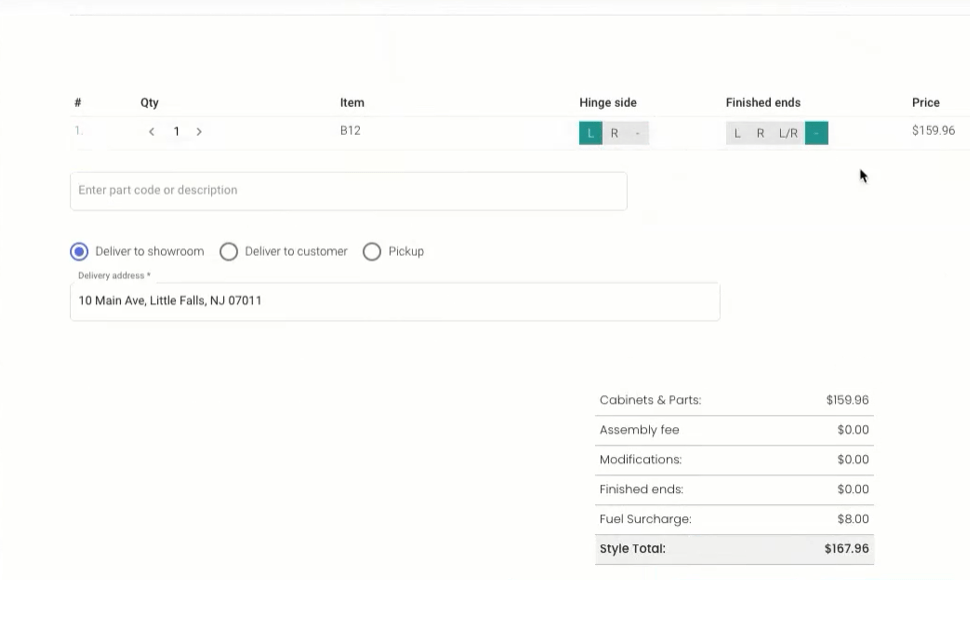
Here are key factors to consider when choosing the best software for your needs:
- Industry-Specific Features: Choose software that caters specifically to your industry. For example, if you are in the kitchen and bath industry, look for features like design integration and project estimation tools. Industry-specific features ensure the software meets your unique operational needs.
- Ease of Integration: Ensure the software integrates seamlessly with your existing ERP systems and other tools. Integration capabilities streamline data flow across departments, reduce manual data entry, and improve overall efficiency.
- User-Friendliness: Opt for software with an intuitive interface that is easy for your team to learn and use. A user-friendly platform reduces training time and ensures that your staff can effectively utilize the software’s features without constant technical support.
- Scalability: Your software should grow with your business. Choose a solution that can handle increasing order volumes and offer additional features as your needs expand, ensuring long-term value and adaptability.
- Customization Options: Look for software that allows customization to suit your specific workflow and business processes. Customizable software can adapt to unique business requirements, providing more flexibility and control.
- Customer Support and Training: Reliable customer support and comprehensive training resources are essential. Ensure the software provider offers robust support to help you troubleshoot issues and optimize the use of the software.
- Cost-Effectiveness: Evaluate the total cost of ownership, including initial setup, licensing fees, and ongoing maintenance costs. Ensure the software provides a good return on investment by increasing efficiency and reducing errors.
By considering these factors, you can select automated order entry software that enhances productivity, improves accuracy, and scales with your business needs.
KitchenDEV vs. NetSuite, QuickBooks, and Acumatica
When choosing the right order entry software and ERP systems for your business, it’s essential to consider how different options stack up against each other. Here’s a comparison of KitchenDEV with three other popular solutions: NetSuite, QuickBooks Commerce, and Acumatica.
KitchenDEV: Specialized and Versatile
KitchenDEV is specifically designed for the kitchen and bath industry, providing features tailored to the unique needs of this market, such as design integration, automated order entry, and advanced project estimation tools, such as dealer portal order automation. What sets KitchenDEV apart is its focus on improving workflow efficiency while reducing errors through its intuitive user interface and customizable options and solutions. It is also important to say that KitchenDEV integrates seamlessly with major ERP systems like NetSuite, QuickBooks, and Acumatica, making it a versatile choice for businesses looking to enhance their existing infrastructure.

NetSuite: Comprehensive but Complex
NetSuite is a highly comprehensive ERP solution that covers a broad range of business needs, from financial management to inventory control. While it provides a robust order management system that can handle complex order processing workflows, its generalist approach means it lacks the specific industry focus that KitchenDEV offers. Additionally, NetSuite’s extensive capabilities come with a higher price point and a steeper learning curve, which might not be ideal for businesses looking for quick deployment and ease of use.

QuickBooks Commerce: Simple but Limited
QuickBooks Commerce is a great option for small to medium-sized businesses that need a straightforward order and inventory management solution. It integrates well with QuickBooks Online, making it a solid choice for businesses already using QuickBooks for accounting. However, its features are more limited compared to KitchenDEV, particularly in handling complex or industry-specific requirements such as those found in kitchen and bath design and installation projects.

Acumatica: Flexible and Customizable
Acumatica is known for its flexibility and scalability, offering a wide range of modules that cater to various business processes, including order management. It is a strong choice for companies that need a highly customizable solution and want the freedom to modify the software to fit their exact needs. However, this flexibility can also mean a more complex setup and a higher demand for IT resources, which might not be necessary for businesses looking for a more straightforward solution like KitchenDEV.

Why Choose KitchenDEV?
KitchenDEV not only provides specialized tools tailored to the kitchen and bath industry but also offers the flexibility to integrate with other leading ERP systems like NetSuite, QuickBooks, and Acumatica. This compatibility ensures that businesses can leverage their existing technology investments while gaining the specific advantages that KitchenDEV offers when looking for kitchen cabinets inventory solutions. For companies looking for a solution that combines industry-specific functionality with broad ERP integration capabilities, KitchenDEV is a top choice.
Automate Order Entry with KitchenDEV
There are several advantages of using KitchenDEV order entry software. One of the main pros is increased efficiency. With automated order entry, orders can be processed much more quickly and accurately, which can save time and reduce errors. KitcheDEV is the best order entry software that can help to improve the accuracy of orders, reduce the number of mistakes, save money on labor, and improve customer satisfaction.

Order entry programs can help to improve communication among staff which can reduce wait times. By reducing wait times, eliminating errors, and improving accuracy, cabinet order entry programs can help to enhance the overall customer experience. This way you can continue building client loyalty and increase repeat business. An order entry program can include inventory management features, which can help to streamline the process of tracking inventory levels, ordering supplies, and managing costs.
Check out Adornus success story for more details! Find out how our order entry software can help you beyond order processing and fulfillment, by improving your supply chain management. Tracking and sourcing information you need for customer orders will be faster and easier, as well as dealing with returns.
Beyond improving management ensure your order entry is integrated and automatized to help staff not get overwhelmed and keep productivity high where it matters. Analyze your sales data effectively so you can make the necessary adjustments and pinpoint chances for upsells and discounts. All of these amazing features will help you improve both your client retention rates and customer satisfaction rates.
Order Entry Systems FAQ
- What is order entry system, and how does it work?
Order entry system is a digital tool that automates the process of recording and managing customer orders. It streamlines the workflow by capturing order details electronically, reducing manual data entry, and integrating with other business systems like inventory management and ERP (Enterprise Resource Planning) systems. The software improves accuracy, speeds up order processing, and provides real-time visibility into order statuses, inventory levels, and customer information. This integration helps businesses enhance operational efficiency and customer satisfaction by ensuring timely and accurate order fulfillment.
- What are the benefits of using automated order management software?
Automated order management software reduces manual errors, saves time, and increases order processing speed. It improves data accuracy, ensuring that all orders are recorded correctly and consistently, which helps in better inventory management and reduces discrepancies. The software also offers real-time tracking and updates, allowing businesses to respond promptly to changes in customer demand or inventory levels. Automation also frees up staff to focus on more strategic tasks, such as customer service or sales, rather than on repetitive data entry. Overall, it enhances operational efficiency and customer satisfaction.
- How can order management software integrate with existing business systems?
Order management software typically integrates with various business systems like ERP, CRM (Customer Relationship Management), and inventory management systems. Integration is achieved through APIs (Application Programming Interfaces) that allow different software applications to communicate and share data seamlessly. This ensures that all business functions, from order processing to inventory management and accounting, are synchronized, providing a unified view of operations. Integration reduces the need for manual data transfers, minimizes errors, and ensures real-time updates across all systems. Choosing software that supports such integrations is key to maximizing efficiency.
- What should I consider when choosing order management software for my business?
When selecting order entry software, consider factors such as ease of use, scalability, customization options, and integration capabilities with your existing systems. It’s important to choose software that fits the specific needs of your industry and can handle your order volume and complexity. Also, evaluate the level of customer support and training provided by the software vendor, as well as the overall cost, including any setup, subscription, or maintenance fees. Ensuring the software is user-friendly and offers good value for its features will help maximize your investment.
- Can order processing software handle complex order configurations and customizations?
Yes, many order processing software systems are designed to handle complex order configurations and customizations. These systems allow businesses to input detailed specifications, such as custom product dimensions, materials, and features, directly into the software. They can also integrate with design tools and configure-to-order (CTO) capabilities to ensure that custom orders are accurately processed and communicated to manufacturing. This flexibility helps businesses cater to specific customer needs without sacrificing efficiency or accuracy. Always check that the software supports the level of complexity your business requires.
Get Started with KitchenDEV
Start using the KitchenDEV order entry program and utilize all of the amazing features. You can make complex order requirements easy and simplify the entire process. Using the order entry software will allow you to perform advanced actions in a more practical way.
Centralize all of your data in one place and systematically organize it for ease of access and use. Save yourself time and money you would have spent copying, writing, and retyping data manually. At the same time eliminate the possibility of errors that could cost you even more money and wasted time.
There will be no more time lost on fixing mistakes, trying to figure out where things went wrong, and finding solutions. Making ordering more simple and more organized will pay off big time. Don’t hesitate to contact KitchenDEV and try out our dealer portal today!
