Which ERP systems work with a cabinet dealer portal?
Which ERP systems cabinet manufacturers connect to a dealer portal, what each export does in KitchenDEV, and how the ERP stays the system of record.
 Eric E. YildizUpdated 4 min read
The cabinet manufacturers and distributors KitchenDEV works with run general ERP and accounting systems, NetSuite, Acumatica, Microsoft Dynamics 365 Business Central, Odoo and QuickBooks among them, and connect dealer ordering to the ERP instead of replacing it. KitchenDEV's Dealer Portal & Order Automation exports dealer orders to each of those five systems, as a premium module set up against the manufacturer's own ERP.
A cabinet dealer portal does not replace the ERP: the portal holds the catalog, the dealer pricing and the configuration rules, and the ERP stays the system of record for accounting, production and inventory.
Why doesn't the ERP handle dealer ordering on its own?#
A general ERP has no door-style-and-finish configurator, no modification rules with allowed increments, and no ordering screen a dealer would use without training. One buyer told KitchenDEV that the ERP at a previous cabinet company could not take quotes at all, so the quoting tool was built in Excel and every order was keyed by hand. The rules a cabinet order needs are covered in how a cabinet configurator stops invalid orders.
Which ERPs does KitchenDEV's Dealer Portal export orders to?#
- NetSuite. An order in KitchenDEV's Dealer Portal can be exported to NetSuite.
- Acumatica. KitchenDEV's Dealer Portal exports an order to Acumatica as a sales order.
- Odoo. KitchenDEV's Dealer Portal exports an order to Odoo as a sales order. With the Odoo integration, kit and component stock can be shown to dealers during item search, a kit cabinet's stock status is worked out from the stock of its components, and item prices sync when items are pulled from Odoo.
- QuickBooks, including QuickBooks Desktop. KitchenDEV's Dealer Portal exports an order to QuickBooks Desktop as an invoice built from summarized accounting lines under item codes the manufacturer sets up, and shows the QuickBooks transaction ID on the order. Miscellaneous charges can export to QuickBooks one by one, each under its own charge code.
- Microsoft Dynamics 365 Business Central. With the Business Central integration, KitchenDEV's Dealer Portal sends the item code with each exported order, and the export can include a four-character code for door style, carcass construction, finish and drawer type.
How is an ERP integration set up?#
ERP and accounting integrations are a premium module of KitchenDEV's Dealer Portal, built against the manufacturer's own system. What moves between the dealer portal and the ERP, and in which direction, is scoped with the manufacturer before anything is built, so two manufacturers on the same ERP can have different exports. The detail of what an export carries and what comes back is in what an ERP integration sends from a dealer portal.
What if orders start in Design Flex (formerly 2020 Design) instead of a dealer portal?#
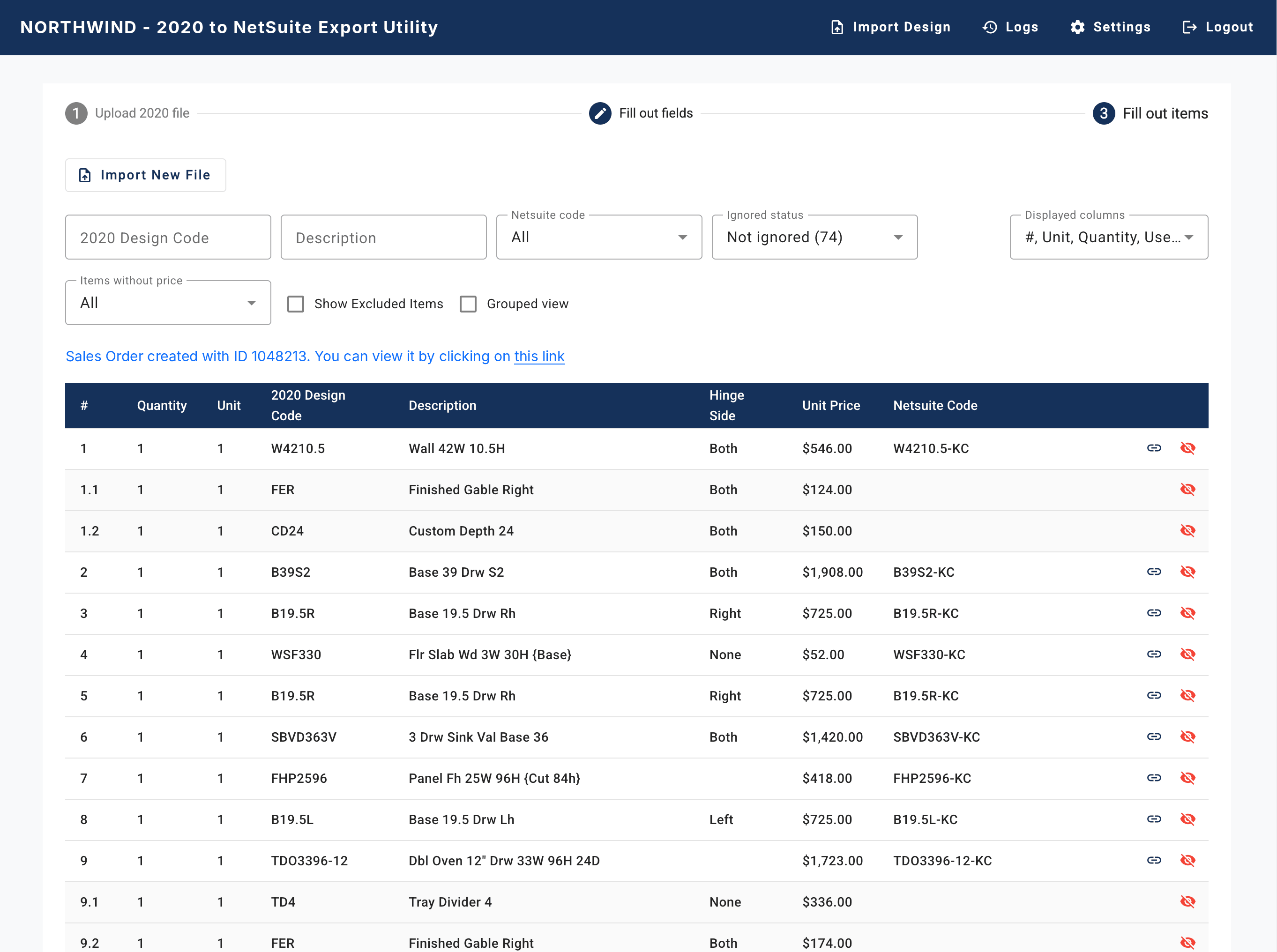
Orders designed in Design Flex can go to the ERP through KitchenDEV's 2020 to ERP Connector, a separate product. NetSuite has been a live target for KitchenDEV's 2020 to ERP Connector since 2020, with quote, sales order, purchase order and invoice creation. Acumatica, Microsoft Dynamics 365 Business Central, QuickBooks Desktop, QuickBooks Online, Sage and other ERPs with a well-documented open API are set up per customer, after KitchenDEV verifies the ERP, its version, its API and the transaction type needed.
What should a manufacturer ask before connecting a dealer portal to its ERP?#
- Which transaction should a dealer order become in the ERP: a sales order, an invoice or something else?
- Should an order arrive line by line, or as summarized lines such as one line for the whole kitchen?
- Which item codes does the ERP expect, and who keeps them matched to the catalog?
- Do tax, delivery and discounts travel with the order, or does the ERP calculate them?
- Which ERP does the vendor send orders to today, for a client that is live on it?
FAQ#
No. KitchenDEV is not an ERP. KitchenDEV's Dealer Portal & Order Automation is the dealer-facing catalog, quote and order system, and sends orders to the ERP the manufacturer already runs.
No. KitchenDEV's Dealer Portal exports orders to NetSuite, Acumatica, Odoo, QuickBooks (including QuickBooks Desktop) and Microsoft Dynamics 365 Business Central, and the manufacturer's existing ERP stays the system of record.
NetSuite is the live target for KitchenDEV's 2020 to ERP Connector, with quote, sales order, purchase order and invoice creation. Other ERPs with a well-documented open API are set up per customer once KitchenDEV has verified the system and the transaction type needed.
See which systems a dealer order can reach on the Dealer Portal & Order Automation page, or book a demo.