
Manufacturing can be challenging, especially when balancing unique customer requirements with quick delivery. The CPQ will make the whole process simpler by facilitating ease in product configuration, accurate pricing, and instant quote generation.
From reduced errors and greater efficiencies down to improved customer satisfaction, in this blog, we will discuss the benefits that come along with the use of CPQ solutions. You’ll also find a step-by-step process for effective CPQ implementation, understand common problems, and get practical recommendations to ensure seamless adoption.
What is CPQ?
CPQ refers to Configure, Price, Quote. This software solution allows any business to achieve speed in product configuration, precision in pricing, and the issuance of quotes to their customers. For cabinet manufacturers like you can customize cabinets to customer specifications, calculate prices from various variables like materials and labor, and produce professional quotes- all in minutes.
How CPQ Implementation Helps Manufacturing Businesses
CPQ can significantly impact manufacturing businesses. It solves massive pain points, such as pricing inaccuracies, the slow creation of quotes, and complexity in product configuration. But why is successful CPQ implementation necessary?
Efficiency: This smooth implementation will enable your team to introduce the system into practice right away.
Accuracy: Proper setup means fewer errors in pricing and configuration, which means fewer customer complaints.
Customer Satisfaction: Quicker quotes with correct pricing mean happier customers and more closed deals.
Benefits of CPQ Implementation for Manufacturing Businesses
A CPQ solution can transform the way a manufacturing business works by bringing much-needed improvement in most aspects of the company’s functions. Indeed, CPQ software automates processes and streamlines them for efficiency, thereby allowing teams to be well-equipped to cater to the demands of customers.
Here are some of the significant CPQ implementation advantages you stand to gain by adopting the system:
Better Customer Insights
Most of the CPQ implemantation systems have analytics capabilities that help understand customer needs and preferences in order to offer them relevant options.
Faster Quoting
No more endless waiting! With CPQ solutions, you'll get a quote in mere minutes.
Improved
Accuracy
Automation of calculations dramatically reduces human errors in pricing and configurations, hence getting your quotes spot on.
Increased Sales
Quicker responses to customer inquiries mean you're more likely to close deals and boost your revenue.
Improved
Collaboration
Centralization of data supports better collaboration across different teams, which could have otherwise been siloed, hence poor communication.
Role of CPQ Implementation in Kitchen Cabinet Manufacturing
CPQ implementation solutions are among the most crucial elements in enhancing operational efficiency to meet customer demands within the competitive kitchen cabinet manufacturing scenario. With CPQ, the manufacturers can answer the complexity associated with the custom order with more accuracy and speed. Some other specific advantages of CPQ implementation include:
Mass Customization
CPQ systems let manufacturers manage complex product configurations quite effortlessly; this enables them to accommodate each customer's unique specifications without overwhelming their salesforce.
Streamlined Production Processes
Production teams with fast and efficient quotes coupled with detailed specifications ensure less hitch and a possible improvement in the workflow.
Inventory Management
CPQ will integrate with any inventory management system so that the manufacturer has appropriate material at the right time, thereby reducing production downtime.
Smarter Communication
CPQ provides a unified platform in which data is shared; hence, CPQ enhances communication between sales and production teams. Such collaboration guarantees that everyone is informed about the exact customer requirements and the status of the orders.
CPQ Implementation Guide
Ready to apply CPQ to the process in your cabinet manufacturing business but find yourselves drowned by questions such as where to begin or which software to use?
Do not worry.
Here’s a step-by-step CPQ implementation guide to get you started:
-
1. Assess Your Needs
Highlight exactly what issues you need to take care of regarding CPQ. By knowing your pain points, you can mold the solution according to your needs.
-
2. Choose Your Software
There are a lot of CPQ software options out there, but when it comes to CPQ, KitchenDEV is really the way to go for your business. This software is specially designed for a kitchen cabinet manufacturer to easily configure, price, and quote goods because of its strong features. Due to its ease of use and powerful customization options, it will be ideal for businesses trying to maximize their operational efficiency.
-
3. Plan your implementation
Outline a detailed timeline and assign responsibilities. A structured plan means that everybody knows their roles and when.
-
4. Data Migration
Transfer data on the products existing in the company and the pricing data into the system. Data migration should be very accurate to make CPQ effective.
-
5. Customization
You should, therefore, customize KitchenDEV to suit your product offering and pricing. That way, you will be setting up the software to support your specific business model.
-
6. Training
Ensure that you are providing full training for your staff so that everyone is comfortable on the new system. Proper training means maximum user adoption with minimum resistance to change.
-
7. Go Live & Monitor
Now, it is time for your CPQ deployment, and you should keenly monitor its performance against any jitters. This will also involve continuous tuning after going live for peak performance.
CPQ Implementation Challenges
While the implementation of the CPQ solution can bring very significant benefits, one should be invariably aware of a number of challenges. Common CPQ implementation challenges include:
Resistance to Change: There are team members who may resist adopting the new technology, and this will undoubtedly slow down the entire process.
Data Quality Issues: If the data you currently have is not clean or organized, this could be a very challenging migration of data into the new system.
Integration Issues: Your CPQ may not be easily integrated with other systems, such as an ERP or CRM system. That will then need more emphasis and resources.
Ongoing Maintenance: The system should be continuously updated and maintained to run flawlessly and remove bugs that may arise over time.
Our team will guide you through everything from implementation to troubleshooting a glitch. We are just a call or an email away, and together, we should be able to overcome these impediments and set your business up for success.
How Does KitchenDEV CPQ Software Help Kitchen Manufacturers Streamline Their Processes?
CPQ software, especially solutions like KitchenDEV, is designed to really raise the efficiency bar for cabinet manufacturers. It automates essential processes and gives real-time insights on how to deliver quick, accurate service that will satisfy customers. Following are some of the key ways in which KitchenDEV helps streamline operations:
Automation of Configuration
KitchenDEv's CPQ system helps manufacturers automate their product configuration and make rapid modifications according to customer requirements. It reduces the potential for manual errors and expedites the design process.
Real-time Pricing
Along with integrated pricing engines, our CPQ software provides real-time pricing for configurations of choice and material to be used, making quotes very accurate and true to cost changes.
Inventory Management
KitchenDev CPQ software allows the tracking and tracing of materials and components for inventory management so that when a company needs them, it can have them.
Efficient Quoting
The software generates professional quotes rapidly, enabling sales teams to respond to customer inquiries without delay. It can significantly shorten the sales cycle.
Integration with Other Systems
Our CPQ solution integrates pretty well with ERP and CRM, offering one workflow, thereby enhancing the efficiency of the operation as a whole.
KitchenDEV Advantages for Kitchen Manufacturers
KitchenDEV is a powerhouse that streamlines kitchen manufacturing processes. Here’s why it’s one of a kind and how it’s going to make your life that much more straightforward:
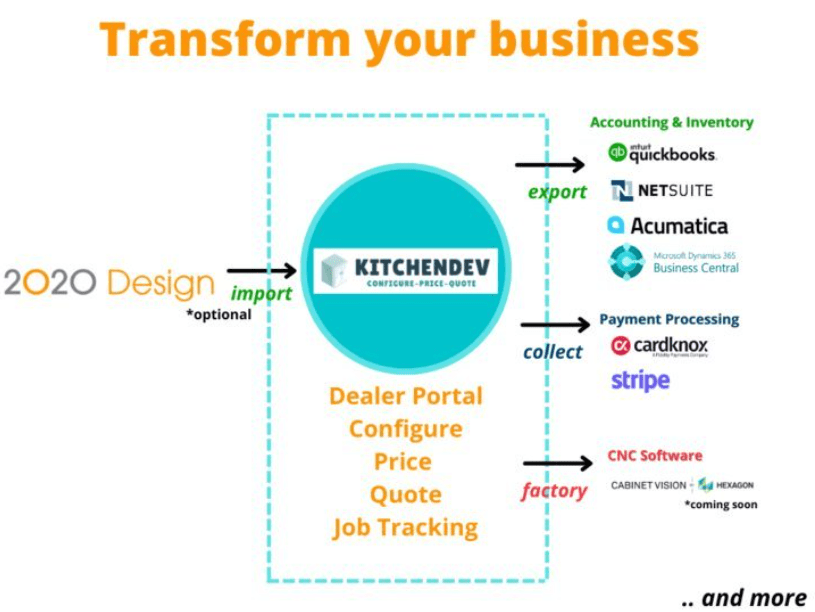
Seamless Integration: Smoother integration means KitchenDEV seamlessly integrates with 2020 Design, inventory systems, and accounting software. For the first time, one can take care of the whole workflow, from designing to taking care of the customer, from one spot.
Advanced Product Configuration: KitchenDEV makes customizing cabinet styles, materials, finishes, and components easy. The ability to tailor quotes increases the accuracy of meeting customer needs and eliminates any uncertainty in the sales process.
Real-time Pricing and Quoting: Goodbye to obsolete pricing. In cases of configuration changes, KitchenDEV updates the pricing in real-time, so quotes always show current costs. It quickens the quotation process, adding more accuracy.
Dealer Portal & Order Automation: The intuitive dealer portal automates everything from price quoting through returns and beyond, saving a ton of administrative time and allowing you to focus on what matters most to customers.
Cabinet Retailer Suite: KitchenDEV provides an easy pricing and ordering solution for stock cabinet catalogs. Its smooth interface will simplify the process of importing SKUs or allow for easy manual creation, facilitating seamless collaboration with manufacturers and customers.
2020 to ERP Connector: In case you use 2020 Design, then KitchenDEV’s connector will let you import your designs right into your ERP as sales orders-accurate and in no time. It saves a great amount of time by eliminating errors.
Robust Integration: It easily integrates with large ERP and CRM systems like QuickBooks and Microsoft Dynamics. Be it any department, it assures that everybody works on the same trusted data, thereby enhancing the overall operational efficiency.
It’s all about working smart, not hard, and with KitchenDEV at your side, you will learn how to streamline processes and elevate your customer experience.
How a Successful CPQ Implementation Should Be
-
1. Define Your Goals and Needs Clearly
Define specific challenges that you want to try to improve first. Gather input from different levels of stakeholders as to what they need and may expect from Sales, Production, and Finance. You will be better positioned to set achievable goals and plot your path to success.
-
2. Establishment of Implementation Group
Bring in a dedicated team that should include a project manager, product leader, IT manager, sales representative, and finance representative who will assist and work through the implementation process to ensure insights across all dimensions and keep the project on track.
-
3. Document Your Product Catalog
Before getting down to the technical aspect, map your product catalog in as much detail as possible. Chart all possible product configurations, pricing rules, and discount structures. Foundational works will make it easier to set up KitchenDEV effectively.

-
4. Configure Products and Pricing Rules
Having the documented information at hand, start with product setup in KitchenDEV: set their price lists, discount rules, dependencies, or limitations, if needed. It is a crucial step to ensure that the software reflects your business logic accurately.
-
5. Integration with Existing Systems
KitchenDEV is designed to integrate well with ERP, CRM, and other integrated systems. Work with the implementation team to help the integrations go smoothly. This will let the implementation process set up smooth information flow interdepartmentally, hence improving the general efficiency.
-
6. Training Your Team
Complete training will be vital in the successful adoption of KitchenDEV CPQ solution. Again, ensure that users know how to use the system, are able to navigate it easily, and know the features of the system. Additionally, ongoing support and resources are necessary to help team members get comfortable with the new software.
-
7. Full Testing Before Launch
Perform extensive testing with the system before going live; this should include unit testing of individual components, integration testing for data flow between systems, and user acceptance testing to receive input from real users. Any issues identified in testing should be fixed to ensure a smooth rollout of the system.
-
8. Launch and Performance Monitoring
With everything now set, it is time to launch KitchenDEV. After the CPQ deployment, monitor website performance based on relevant KPIs set at the start of the process. Also, from time to time, check in with the users for their feedback and make necessary changes.
-
9. Continuous Improvement
CPQ implementation is not a not a one-time activity; it is a continuous process. Your usage of KitchenDEV should be further refined with user feedback and continuous changes in business needs. Regular updating and enhancement will ensure that you realize maximum value from this investment.
Follow these steps with KitchenDEV for a very successful CPQ implementation, which will smoothen your processes, enhance collaboration, and eventually increase customer satisfaction. And remember, we are here to guide you through all of the steps.
CPQ Implementation FAQ
-
What is the CPQ process?
It covers product configuration, price determination, and quote generation within its ambit. The CPQ process enables sales teams to quickly configure targeted solutions to meet the particular needs of a customer with accuracy and speed. Steps like these, once automated, help the organization be much quicker in response to queries and also facilitate better deal closure.
-
What does CPQ stand for in manufacturing?
In manufacturing, CPQ refers to software solutions that help companies handle complexities associated with product configuration, determination of price structure, and quote generation.
-
How do you implement CPQ?
Implementing CPQ requires a structured approach that starts with defining business goals and gathering stakeholder input. Next, configure the CPQ software to match your product offerings and pricing rules, followed by integrating it with existing systems. Finally, train your team thoroughly before launching the CPQ solution and continuously monitor its performance.
-
What are the main steps in implementing CPQ software for kitchen manufacturers?
Start by assessing your needs and documenting your product catalog. Next, configure KitchenDEV with your specific products and pricing rules, ensuring integration with other systems like ERP or CRM. Train your team on the new software, conduct thorough testing, and then launch while monitoring performance for ongoing improvements.
-
How does CPQ integration help improve the sales cycle?
Integration of CPQ with other systems will facilitate the free flow of information between departments and update the sales group with the latest data in real time. There will not be any delays in quotations and order processing; hence, quick responses are possible for customer inquiries. Companies can, therefore, close more deals quickly, improving overall customer satisfaction.