How does a cabinet configurator stop dealers from ordering a cabinet that can't be built?
A cabinet product configurator checks every dealer selection against the manufacturer's own rules, so an order that can't be built never arrives.
 Eric E. YildizUpdated 4 min read
A cabinet configurator stops impossible orders by checking each dealer selection against the manufacturer's own rules before the order can be submitted: which choices are required, which modifications a cabinet can take and in what increments, and which options cannot be combined. KitchenDEV's Dealer Portal & Order Automation is a cabinet configurator and dealer ordering portal in which the manufacturer's rules are set once and every dealer quote is checked against them.
A cabinet product configurator is software that lets a dealer build a cabinet order only from combinations the manufacturer can make, priced at that dealer's own pricing.
What does a dealer choose when configuring a cabinet order?#
A dealer configuring an order in KitchenDEV's Dealer Portal first picks the product configuration: product line, face frame, door style and finish or color. A catalog can also require box construction, interior color, a premium hinge or other manufacturer-specific choices, and some manufacturers allow a true custom color, where the dealer gives the paint brand and the color code.
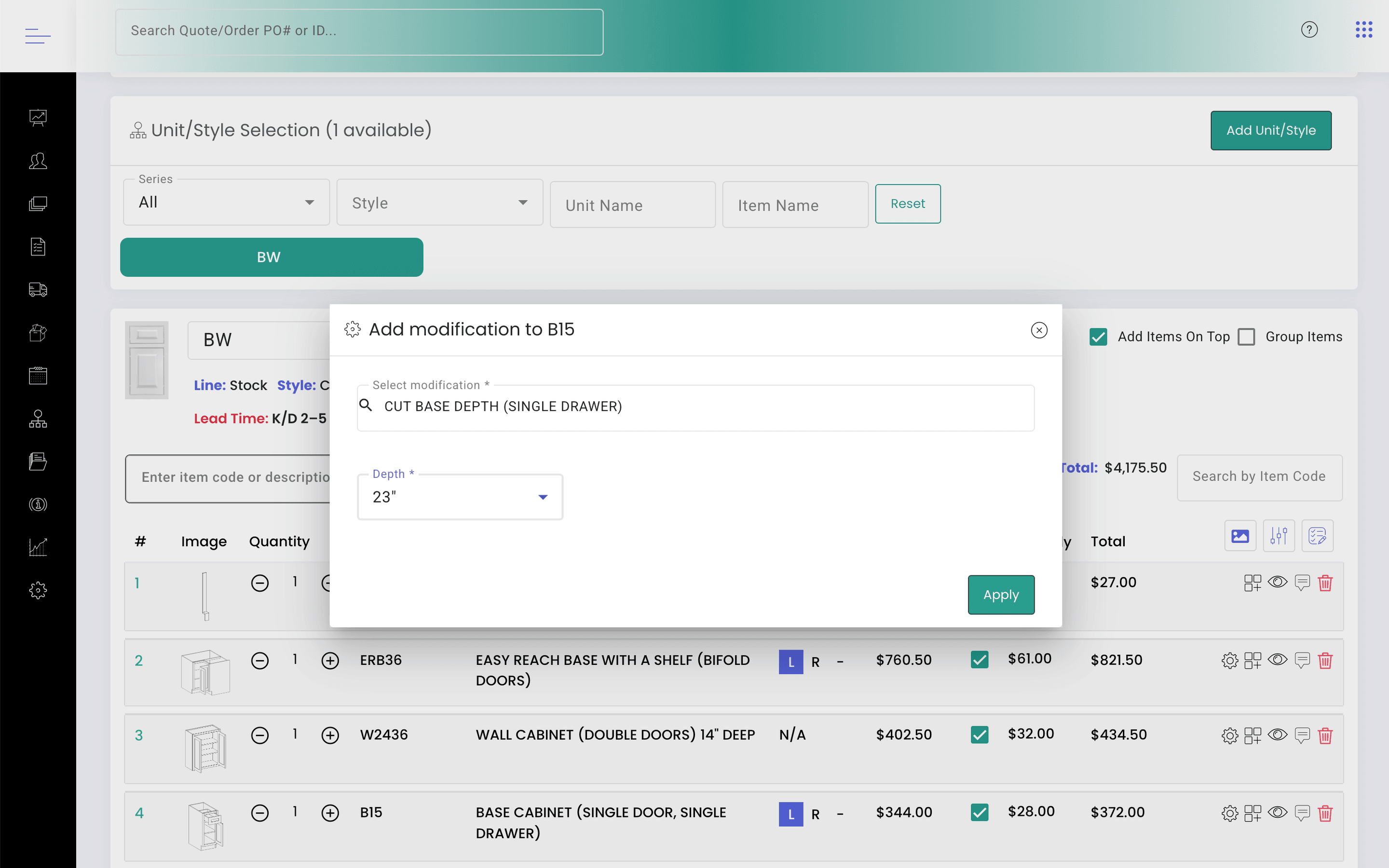
Each cabinet then takes its own choices: quantity, hinge side, finished sides (left, right or both) and assembled or knock-down. Modifications such as a custom width, height or depth, an extended stile or a filler appear under the cabinet as child items with their own price. How the configurator fits with dealer pricing and quoting is covered in CPQ software for cabinet manufacturing.
Which rules stop an invalid cabinet order?#
- Allowed increments and limits. The manufacturer defines the increments, validation rules and required drawings for each modification, and KitchenDEV's Dealer Portal checks the dealer's input against them. A size change can be measured from the cabinet's default size, its minimum or its maximum.
- Modifications that exclude each other. A modification can list the other modifications that cannot be added alongside it.
- Required finished ends. A product line can require a Finished Ends selection before a quote can become an order, and a quote with a finished-end cabinet but no end panel shows a warning before ordering.
- Required notes. A modification flagged "Dealer Note Required" cannot be ordered until the dealer adds a note.
- Assembled or RTA only. Each product line can be set as orderable assembled and RTA, assembled only or RTA only, with a message on the quote when assembly is locked one way.
- Closed product lines. Ordering can be switched off for a product line, with a custom message telling dealers why.
- Imported designs. When a product line requires a unit option, a project imported from Design Flex (formerly 2020 Design) prompts for that option, or the order is blocked until the option is chosen.
- Prices that need the vendor. A dealer whose request needs vendor pricing, such as a custom color, sees a warning that the total is not final, and the manufacturer can require approval before the price is set.
How does a cabinet configurator price a modification?#
KitchenDEV's Dealer Portal prices a modification as a flat fee, a percentage, or per door, per drawer or per hinge, and an advanced modification option can carry its own flat or percentage upcharge. A modification can also change the cabinet's own price by a percentage: a "Door Only" modification set to 70% prices the item at 70% of its total. Every price is then applied at the dealer's own pricing, which is covered in giving each dealer their own cabinet pricing online.
Does KitchenDEV's Dealer Portal show the cabinet in 3D?#
No. KitchenDEV's Dealer Portal has no 3D visualization. KitchenDEV's Dealer Portal handles what comes after the picture: validated configuration, dealer pricing and ordering. One manufacturer bought a graphics-first web configurator for the visual side and came back to KitchenDEV thirteen months later for the cabinet configuration the other tool could not do.
What still takes work?#
- The catalog. KitchenDEV builds the manufacturer's catalog in KitchenDEV's Dealer Portal during onboarding, from the price sheets and catalog data the manufacturer sends. On most onboardings the catalog build is the longest step.
- The product structure behind the rules. Rules follow how the cabinets are made. On one onboarding with two brands, one brand's universal boxes needed a separately ordered finish panel for exposed sides and the other brand's boxes came pre-painted, so exposed-side selection was switched on for one brand and off for the other.
FAQ#
A product configurator handles the "configure" step of CPQ (configure, price, quote): it decides which product combinations are valid. KitchenDEV's Dealer Portal & Order Automation combines the cabinet configurator with dealer pricing, quotes and online ordering.
Yes. A dealer exports the project from Design Flex as a file and imports that file into an estimate in KitchenDEV's Dealer Portal, where the lines are checked against the product line's required options and priced at that dealer's pricing.
KitchenDEV sets up the catalog and the configuration rules with the manufacturer during onboarding, and the manufacturer's own team can then edit modifications, limits and product-line settings in KitchenDEV's Dealer Portal.
See how a dealer configures and orders on the Dealer Portal & Order Automation page, or book a demo with a cabinet from your own catalog.