Kitchen design software is indispensable for both professionals’ and homeowners’ designs. These tools streamline the design process and offer cost-effective solutions, eliminating the need for hiring external designers. By leveraging such software, users can customize their kitchen layouts, ensuring that personal preferences are met without external interference. These platforms provide immediate cost estimations, allowing for better budgeting and planning.
There are multiple types and versions of kitchen software options on the market. Some of them are free, while others are charged. Then some offer some free access, and if you would like to utilize more features you need to pay a monthly/yearly fee.
We have carefully selected kitchen design programs that have been proven to be amongst the best ones. Correspondingly, we have created a comparison list for you, which includes people’s opinions, not just experts’ opinions, so you can choose your own easily.
The Importance of Kitchen Design Solution in the Modern Design Process
With technological advancements driving innovation, these software tools have revolutionized way designers and homeowners approach kitchen renovations.
The significance of kitchen design software lies in its ability to streamline the design workflow, enhance visualization, and facilitate collaboration between stakeholders. By harnessing the power of 3D modeling and rendering, designers can create lifelike representations of kitchen spaces, allowing clients to visualize concepts with unprecedented clarity. This accelerates the decision-making process and minimizes the risk of miscommunication and costly revisions.
Statistics further underscore the impact of technology on kitchen renovations. According to some recent surveys, designers now rely on design software for kitchen projects, citing improved efficiency and client satisfaction as key benefits. The interviews with designers indicate a growing demand for these tools among homeowners seeking to transform their kitchens into functional and aesthetically pleasing spaces.
The integration of augmented reality (AR) and virtual reality (VR) technologies has elevated the design experience further, allowing users to immerse themselves in virtual kitchen environments and make informed design decisions in real time. This level of interactivity enhances user engagement and fosters a deeper understanding of spatial concepts and design possibilities.
The adoption of kitchen design program represents a paradigm shift in the way kitchens are conceptualized, planned, and executed. By harnessing the power of technology, designers and homeowners alike can unlock boundless creativity, efficiency, and precision in bringing their kitchen visions to life.
Key Factors to Consider in Kitchen Design Software
When selecting the ideal kitchen design solution, it’s essential to evaluate the following aspects:
Ease of Use
Is the interface intuitive and user-friendly?
Design Capabilities
Does it offer advanced 3D modeling and rendering?
Integration
Can it integrate with other tools or platforms you use?
Pricing
Is it within your budget? Are there free trials or versions available?
Support and Resources
Does the software provide adequate customer support and learning resources?
Kitchen Design Software Comparisons
To provide a clear overview, here’s a comparison of three prominent kitchen design software options:
In-Depth Reviews
2020 Design
- Overview
2020 Design is a powerful tool tailored for kitchen and interior designers, manufacturers, and retailers. It excels in producing high-definition renders, providing a realistic visualization of spaces.
The software offers an extensive library of cabinetry, appliances, and fixtures, allowing designers to create highly detailed and lifelike kitchen layouts. Its high-definition rendering capabilities ensure that clients can visualize their projects with precision.

- Key Features:
- Advanced 3D modeling and rendering capabilities
- Ability to adjust the lighting in visual styles
- Creation of 360-degree panoramas and walkthroughs
One of the standout features of 2020 Design is its seamless integration with cabinet manufacturers, ensuring that designers work with accurate specifications when ordering materials. The software supports 360-degree panoramic views, offering an immersive experience for both designers and clients
- Pros:
- Realistic and high-quality renderings
- Extensive library of customizable components
- Cons:
- The steeper learning curve for beginners, making it better suited for professional designers rather than DIY users
- Higher cost compared to some competitors; it operates on a subscription-based model, with a 30-day free trial available for users looking to explore its features.
- Pricing:
Offers a 30-day free trial upon request; subscription-based model thereafter.
- Who Should Use It?
Ideal for professional designers and retailers seeking detailed and realistic kitchen designs.
ProKitchen
- Overview
ProKitchen is a leading kitchen and bath design software known for its comprehensive manufacturer catalog and advanced visualization capabilities. It is designed specifically for professionals who require up-to-date product listings and high-quality 3D renderings. ProKitchen is a strong choice for professionals who need accurate manufacturer data and advanced rendering capabilities, making it ideal for those who work closely with suppliers and clients.

- Key Features:
- 3D kitchen design with panoramic views
- Regularly updated product catalog from over 300 manufacturers
- Pros:
- Realistic 3D visualization tools enable users to generate realistic renderings and 360-degree panoramas, enhancing the client presentation experience.
- Extensive and up-to-date product catalogs. A major advantage of ProKitchen is its vast library, featuring over 300 manufacturers, allowing designers to create projects with real-world materials and pricing.
- Cons:
- Limited export options
- Subscription can be costly for small businesses or independent designers
- The user interface can be complex for beginners, requiring some time to master.
- Pricing:
Provides a 14-day free trial; subscription-based model thereafter.
- Who Should Use It?
Best suited for kitchen and bath professionals who require detailed designs and comprehensive product catalogs.
SketchUp
- Overview
Developed by Google, SketchUp is a versatile 3D modeling tool used across various design disciplines, including kitchen design. Unlike 2020 Design and ProKitchen, which are specifically tailored for kitchen design, SketchUp offers a more general approach, allowing users to create a wide range of architectural and interior design projects. SketchUp is an ideal option for users who value ease of use and customization, offering a great balance of affordability and functionality.

- Key Features:
- Intuitive 3D modeling interface
- Extensive library of plugins and extensions
- Access to a 3D warehouse for components
- Pros:
- User-friendly and easy to learn, making it an excellent option for beginners
- Flexible with numerous plugins available, including rendering tools and additional design libraries
- A vast 3D warehouse filled with pre-made components significantly reduces the time required to create detailed kitchen layouts
- Cons:
- The free version has limited features
- Less specialized for kitchen design compared to other software
- Lacks manufacturer-specific catalogs, meaning professional designers may need to input product specifications manually
- Pricing:
Offers a free version with basic features; Pro version available at $299 per year unlocks more advanced tools, making it suitable for those who require greater design flexibility.
- Who Should Use It?
Suitable for both professionals and DIY enthusiasts looking for a flexible and user-friendly design tool.
Integrate KitchenDEV for Enhanced Workflow
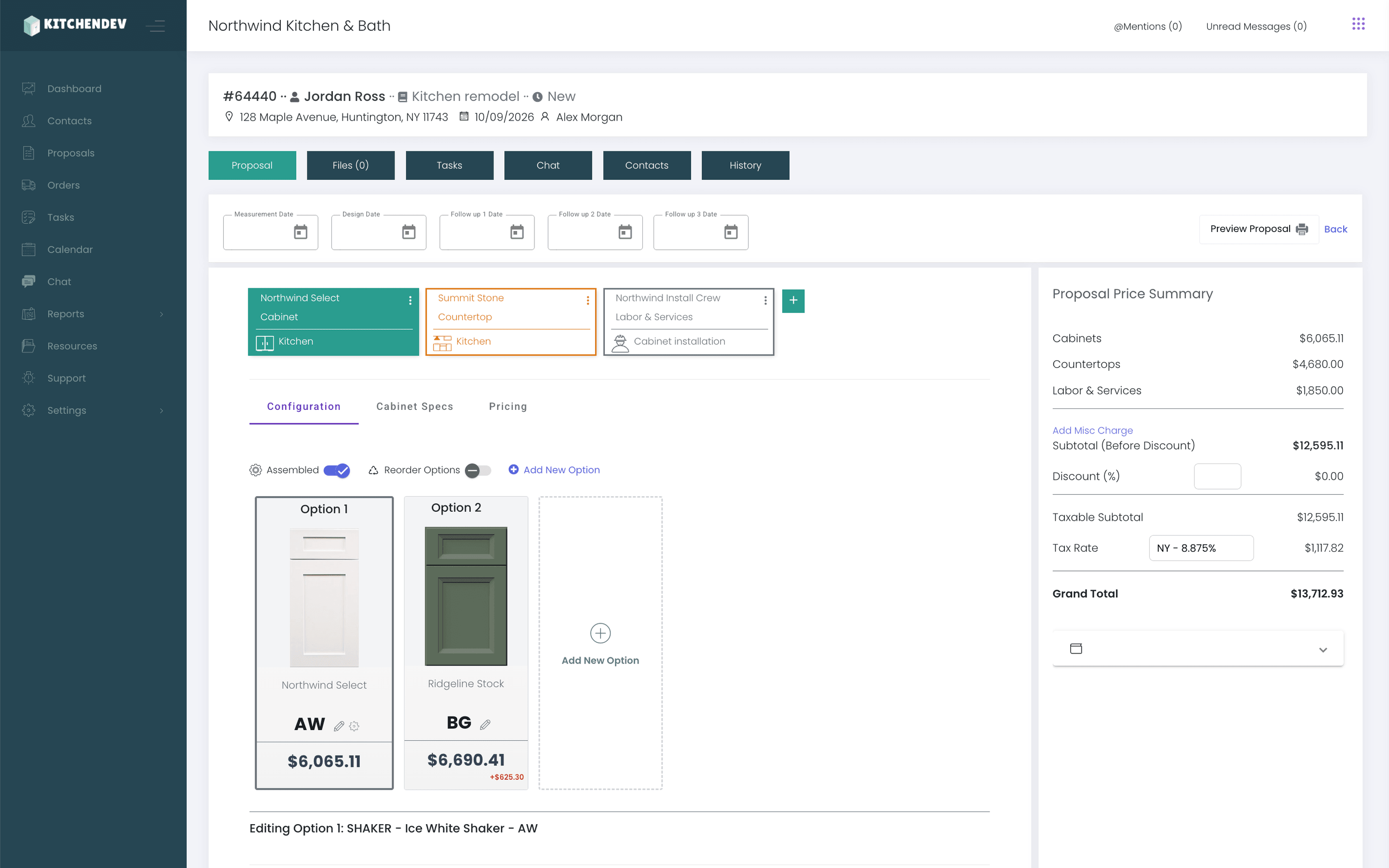
To further streamline your kitchen design and business operations, consider integrating KitchenDEV as a bridge application. KitchenDEV seamlessly connects 2020 Design with various ERP systems such as NetSuite, Acumatica, and QuickBooks, facilitating efficient order management, inventory tracking, and financial operations. This integration eliminates the need for manual data entry, reducing errors and ensuring a smooth workflow.
Especially thanks to 2020 to ERP Connector will help you say goodbye to the hassle and errors of manual order entry.
Key Benefits of KitchenDEV Integration
Seamless Data Synchronization
Automatically sync data between your design software and ERP systems, reducing manual data entry and minimizing errors.
Enhanced Order Management
Streamline the ordering process by connecting design outputs directly to order fulfillment systems.
Real-Time Inventory Tracking
Maintain up-to-date inventory levels by integrating design specifications with inventory management modules.
Improved Financial Operations
Facilitate accurate invoicing and financial tracking by linking design data with accounting systems.
Key Features of KitchenDEV Integration
1. Catalog Mapping
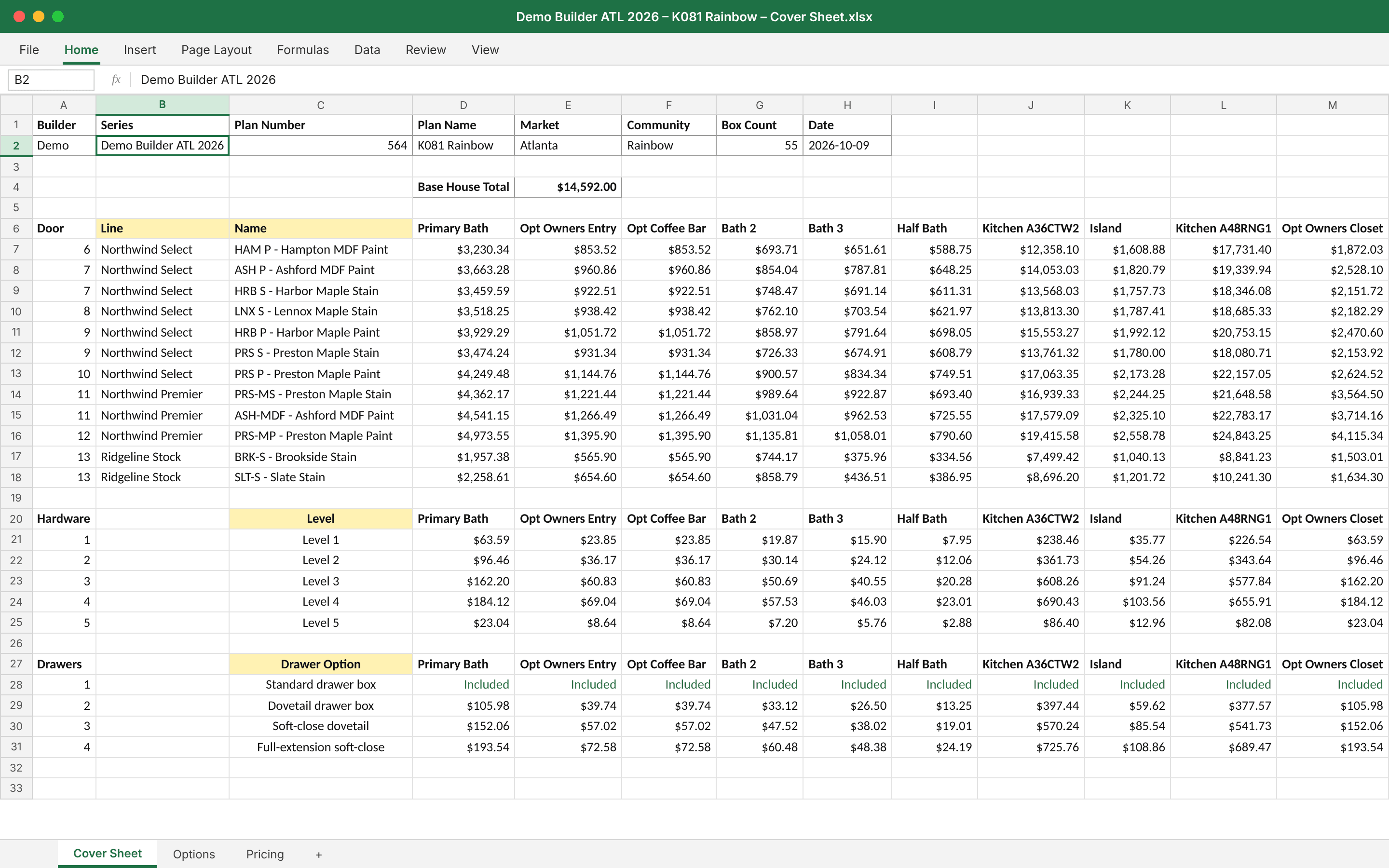
Automatically sync your data sources, including SKUs and corresponding NetSuite, Acumatica, or QuickBooks internal IDs.
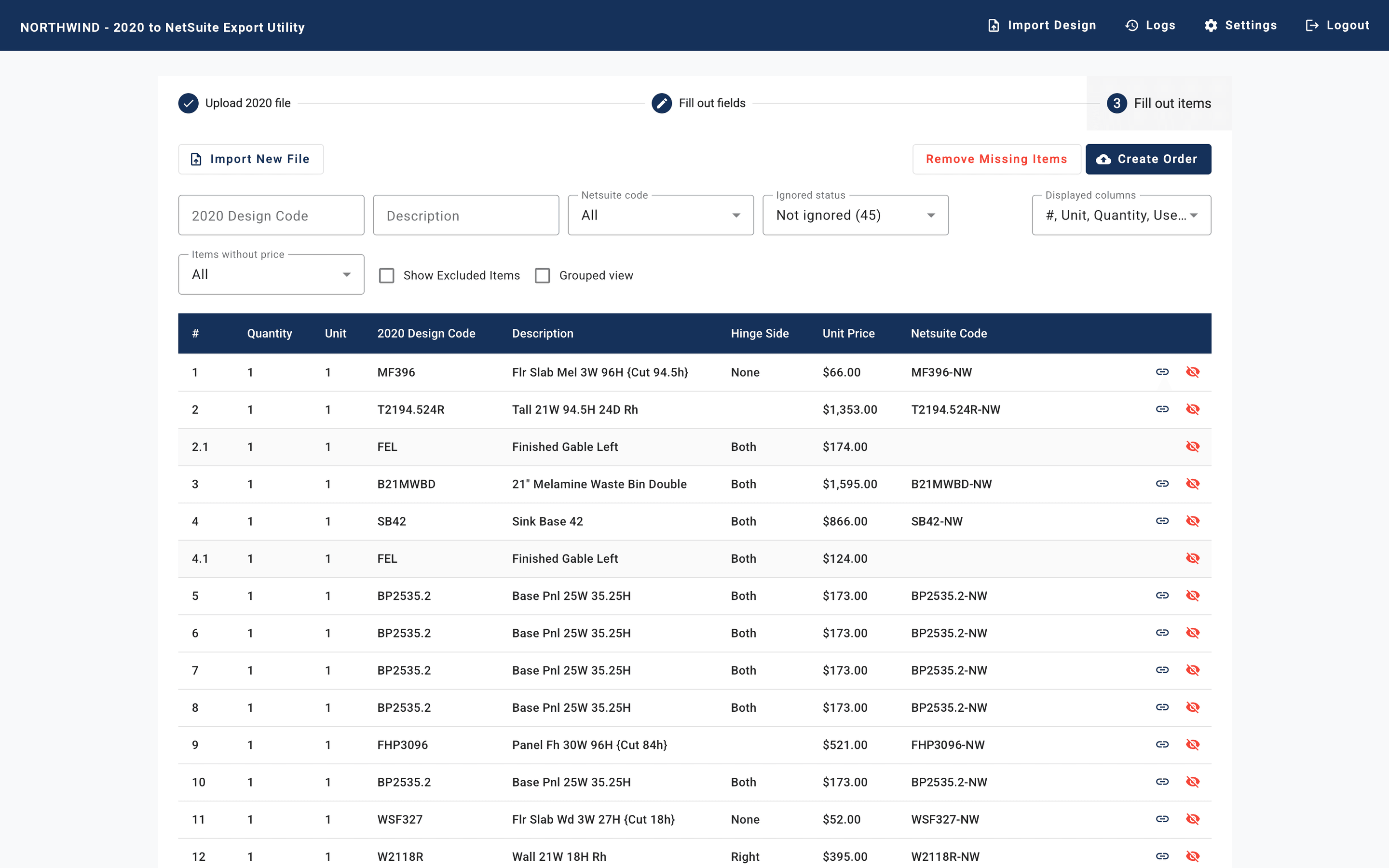
2. Import 2020 Design Data
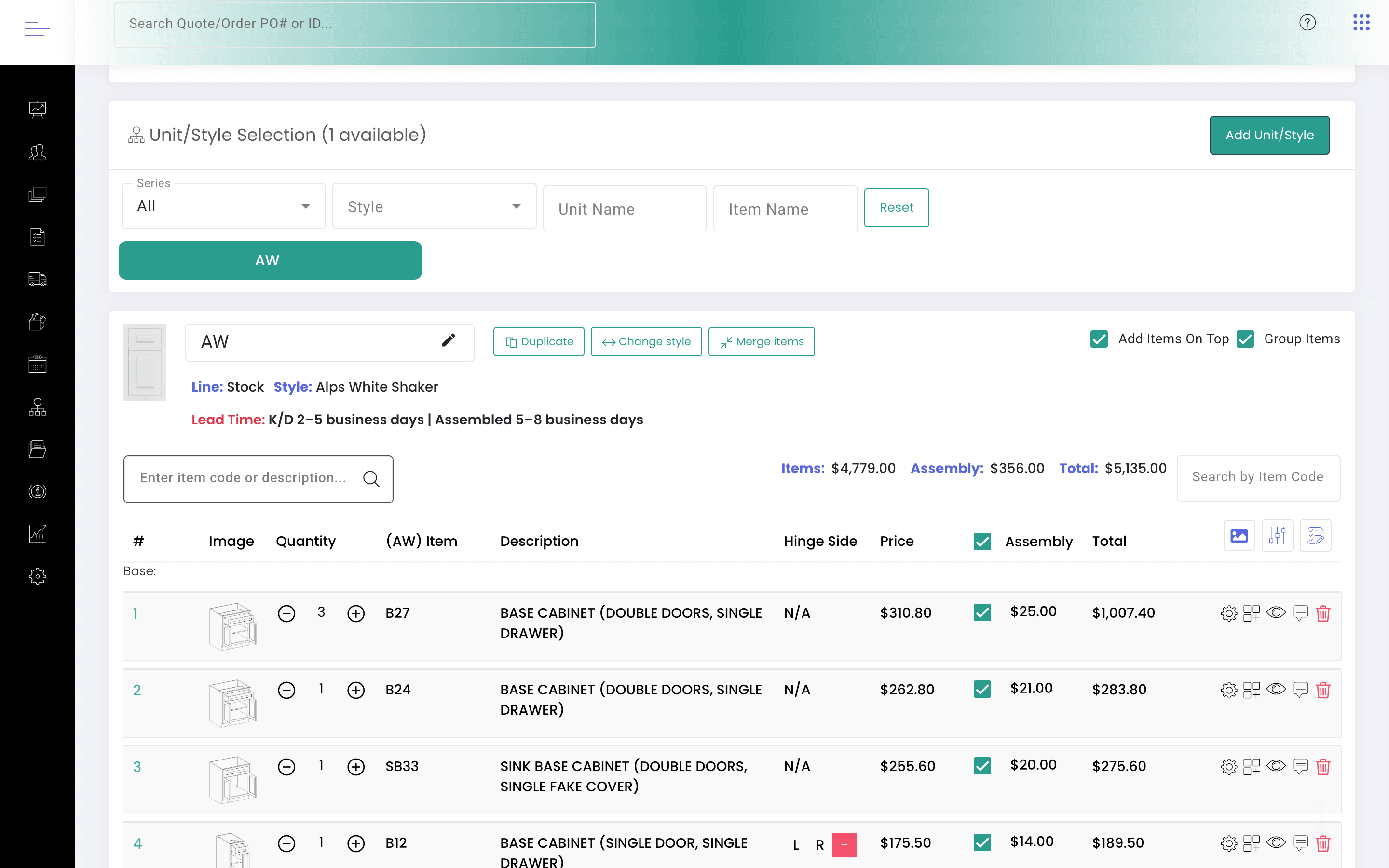
Parse and extract order details from 2020 Design Order Forms, capturing all SKUs, modifications, and custom item options like finished ends.
3. Review Mappings
KitchenDEV provides automated mappings after import, allowing users to review and manually train the tool for improved accuracy.
4. Export to ERP Systems
With all necessary information gathered, users can seamlessly export data into NetSuite, Acumatica, QuickBooks, Sage, Business Central, and more.
KitchenDEV Integrations
By integrating KitchenDEV, businesses can significantly enhance efficiency, from importing kitchen designs to exporting them as sales orders to the ERP of their choice. This ensures real-time inventory tracking, faster order processing, and streamlined financial operations.
Final Verdict: Which One Should You Choose?
Choosing the right kitchen design software depends on your specific needs:
-
For Professionals Seeking Advanced Features
2020 Design offers powerful 3D modeling and realistic rendering, making it ideal for precision-driven projects.

-
For Those Requiring Manufacturer Catalogs
ProKitchen stands out with its extensive product database, ensuring accurate design specifications.
-
For Beginners or DIY Enthusiasts
SketchUp is an excellent choice due to its ease of use, affordability, and flexibility.
-
KitchenDEV as a Solution For All
Regardless of your choice, integrating KitchenDEV can transform your workflow. As a bridge application, it allows manufacturers and dealers to seamlessly sync kitchen designs with ERP systems like NetSuite, Acumatica, QuickBooks, Sage, and more. Users can import kitchen designs from 2020 Design and export them as sales orders, ensuring accuracy and efficiency in order processing.
Why Choose KitchenDEV as Your Primary Solution
By leveraging KitchenDEV, businesses can, allowing them to focus more on design and customer satisfaction rather than manual data entry. This makes it an essential tool for any kitchen manufacturer or dealer looking to optimize operations and stay competitive in the market.
Boost workflow efficiency
KitchenDEV is a bridge application that eliminates the hassle of manual order entry. By connecting your kitchen design software to your ERP system, it automates data syncing, minimizing errors and saving valuable time.
Seamless design-to-order process
Import kitchen designs from 2020 Design and export them directly as sales orders to your ERP, ensuring data accuracy and speed in order processing.
Streamlined operations
Say goodbye to the hassle and errors of manual order entry with our intuitive bridge application that simplifies the entire order lifecycle, from design to delivery.
Enhanced efficiency
The KitchenDEV platform is tailored to meet the unique needs of kitchen manufacturers, distributors, and retailers, enhancing overall workflow efficiency and driving business success.
No training required
Simple and intuitive interface for quick adoption. Get started in minutes with seamless integration.
No long-term contracts
Flexible pricing with no commitments
Conclusion
Most of these kitchen design software programs offer the same features, some offer more, some less, and some in better quality.
While software like 2020 Design, ProKitchen, and SketchUp provide excellent tools for designing kitchens, they lack the comprehensive operational management features necessary to handle orders, inventory, and financial processes efficiently.
This is where KitchenDEV emerges as the ultimate solution.
Say goodbye to the hassle and errors of manual order entry with KitchenDEV. As a bridge application, it connects 2020 Design with your ERP system, including NetSuite, Acumatica, QuickBooks, Sage, and more.
This seamless integration allows manufacturers, distributors, and dealers to import kitchen designs and export them as sales orders, eliminating tedious manual work and reducing costly mistakes.
Need a demo of how KitchenDEV works? Contact us now.