Builder Programs
A base house and every upgrade, on one cover sheet
KitchenDEV Builder Programs prices cabinet packages for production builders: a base house the builder pays for, every upgrade the homebuyer can choose, and one cover sheet per plan.Every builder on their own multipliers. Every option priced before the bid goes out.
Bring a plan and the spreadsheet you price it in.
Selling one kitchen at a time from a showroom? See the Retailer Suite →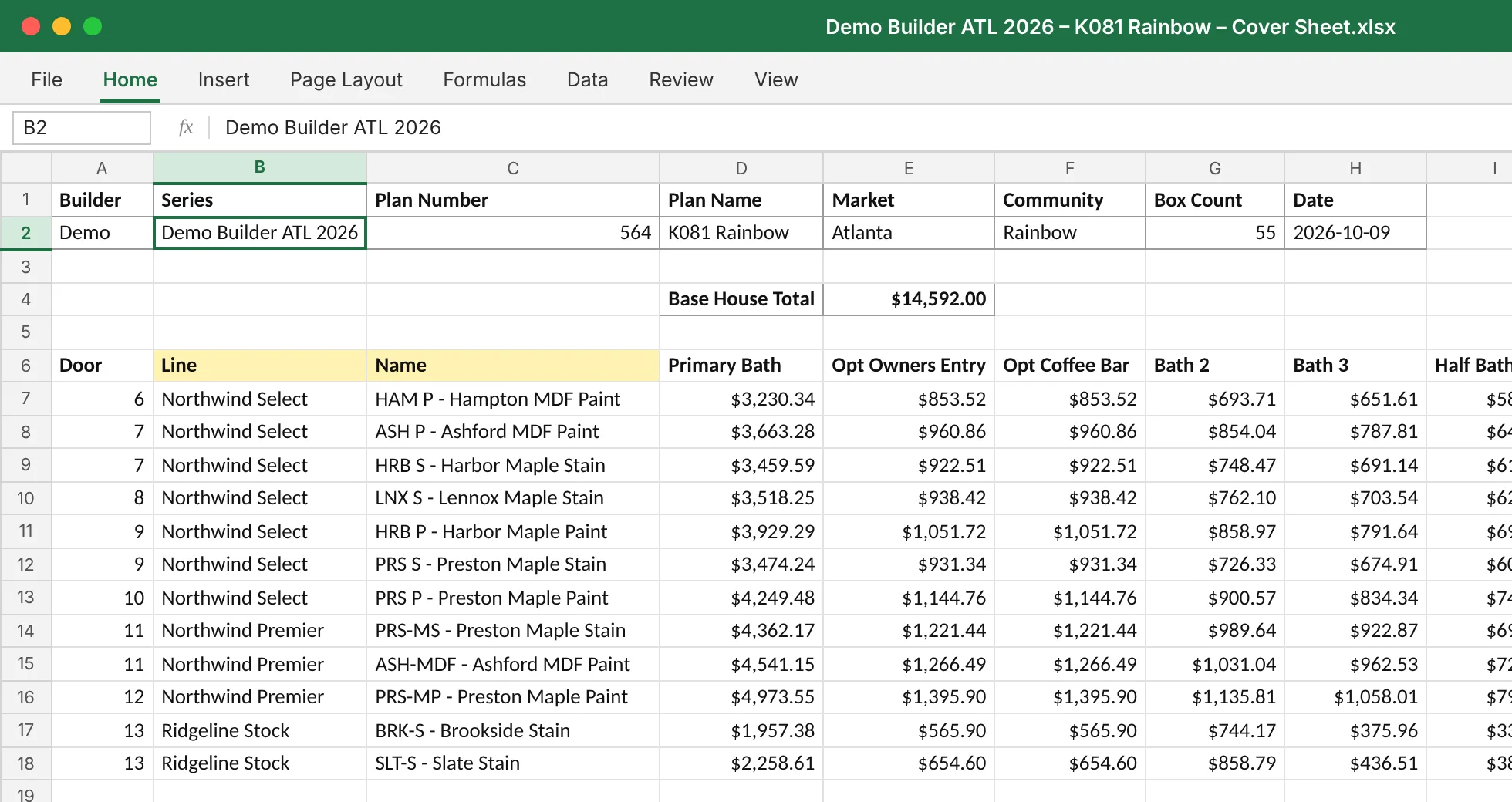
Built for builder services: building-materials suppliers, LBM dealers with a cabinet division, and interior-finishes companies.
Trusted by
Pricing every option on every plan is a full-time job
Each builder you serve has its own multipliers, at several door levels, across several markets. Each plan needs a price for the base house and for every upgrade a homebuyer can choose: door styles, hardware, crown, soft-close and labor by market.
Built by hand, that is one person, full time, copying sheets per plan and re-checking every formula when a price list changes. Mistakes get through, and the margin leaks out through the cells nobody re-checked.
In Builder Programs you set up each builder's series once, and every plan priced from it gets the same options and the same math.
From the price list to the cover sheet
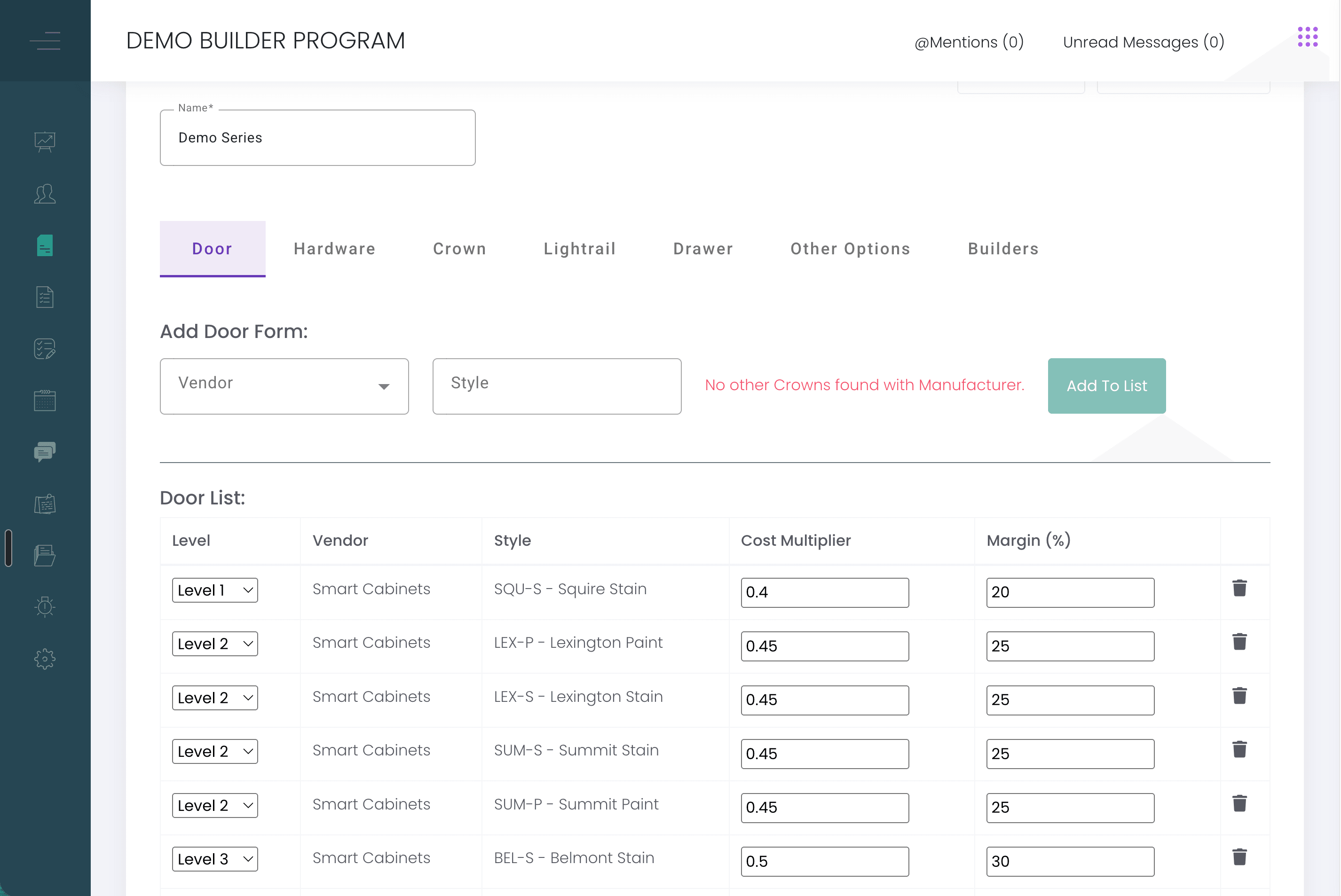
Build a series for each builder.
Door, hardware and crown levels, a level on every door, the builder's multipliers and their own pricing options. Copy a series to start the next builder, scale every price in it by a percentage, or lock it.
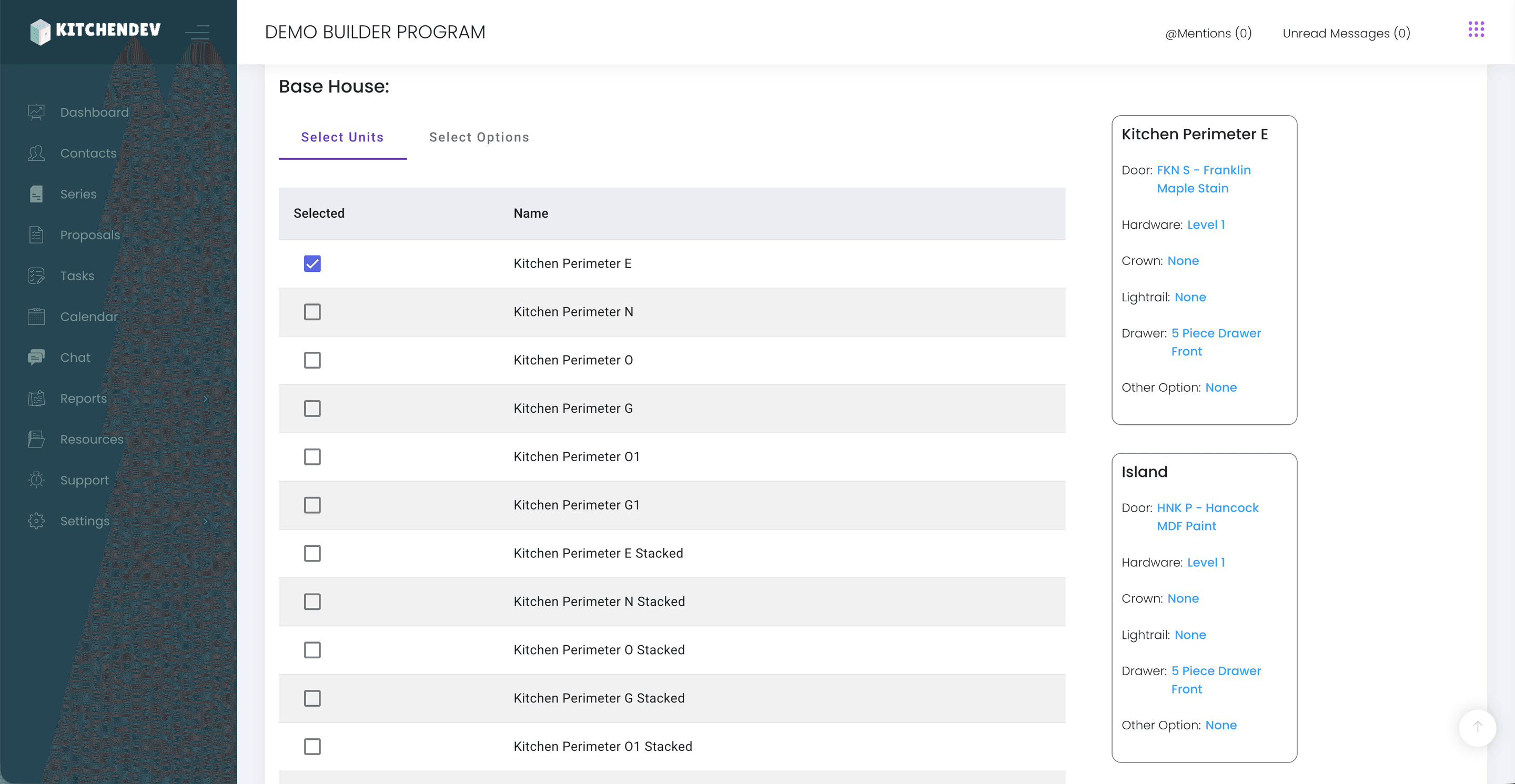
Set the base house.
The cheapest option in each category is picked for you, and the base house total shows its own breakdown.
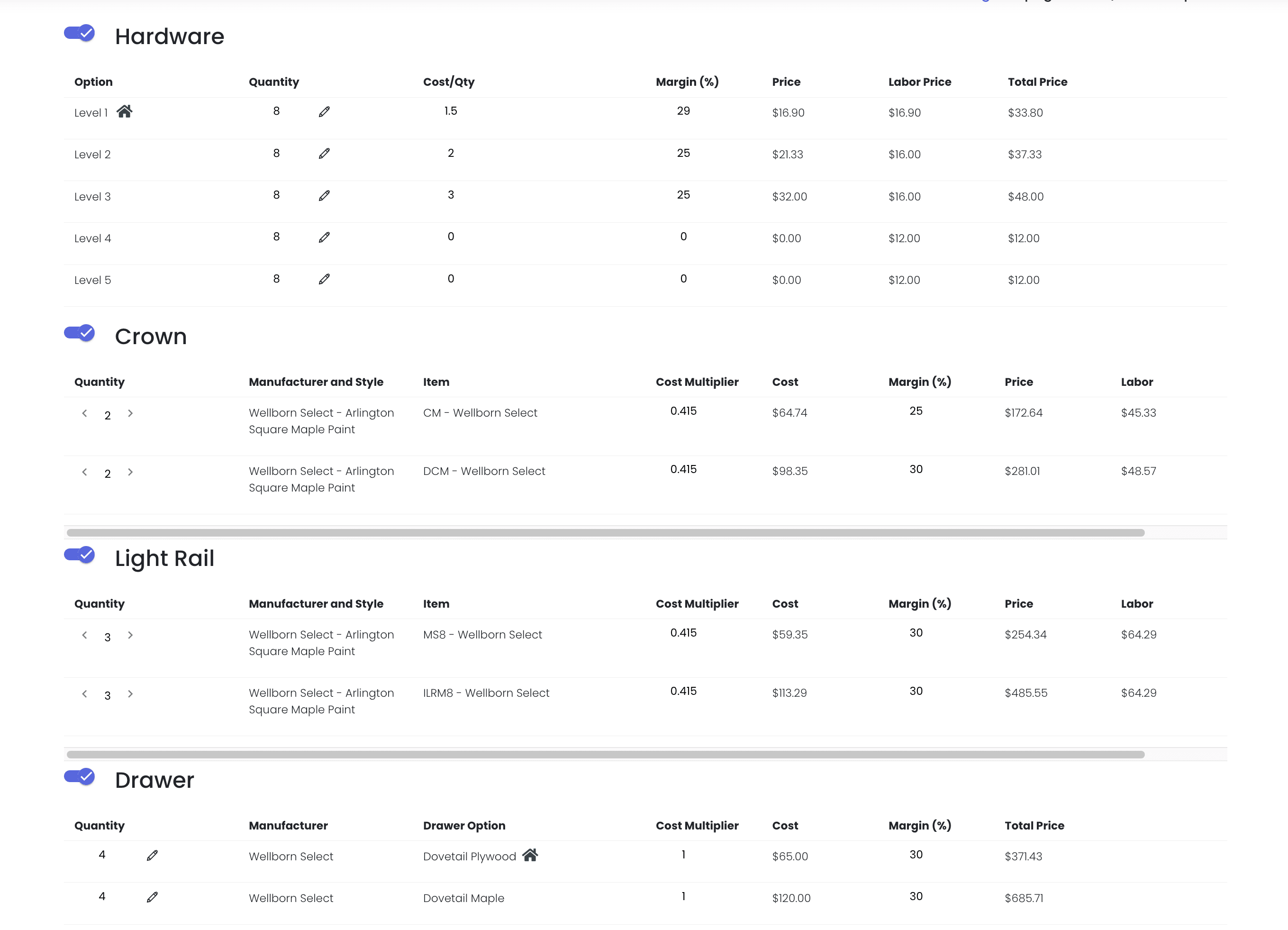
Price every option.
Up to five hardware levels, door levels per series, and add-ons like soft-close doors priced per door from each cabinet's door count. Labor is priced per market, and changing the market on a bid recalculates it.
Hand over the cover sheet.
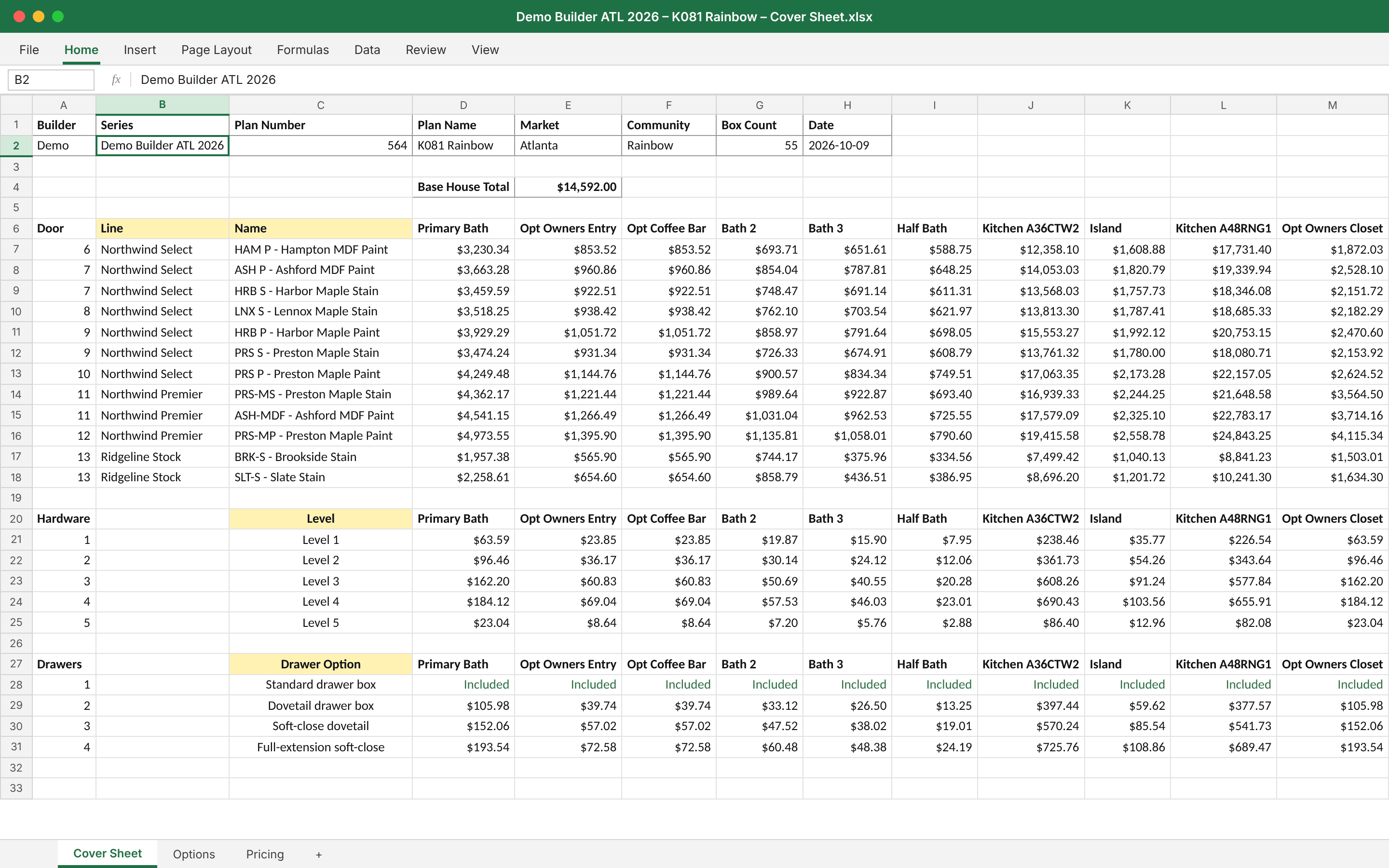
One Excel file per plan: builder, series, plan number and name, market, community, box count and date, with the base house price and every upgrade from cheapest to most expensive. Leave out any section you don't want shown.
Who it helps
Estimators
Set up each builder's series once. Every plan priced from it gets the same options and the same math. Change the market on a bid and labor recalculates.
Owners and GMs
Stop paying one person to copy sheets for every plan. Your margin lives in multipliers you set at every level, and any change that would reach live plans asks for confirmation first.
Sales
Hand each builder one Excel cover sheet per plan, with the base house and every upgrade from cheapest to most expensive. Leave out any section you don't want shown.
What clients say
- 100,000+estimates and orders processed on KitchenDEV since 2018
- 2025Builder Programs in production since
“It has been phenomenal.”
“It looks fantastic. I'm amazed at how much stride you've made in a short amount of time.”
“Our new pricing tool is great, and our whole team is busy getting pricing out to builders!”
Your multipliers, at every level where they differ
Builder Programs carries the pricing layers you already work with:
- 1A global multiplier, then one per customer type, then one per builder.
- 2A style-level override at each of those tiers.
- 3Door-style multipliers overridden on a single bid.
- 4Cost overrides per door, drawer, crown and lightrail, on the series or on the bid.
- 1GlobalYour house multiplier
- 2Customer typeBuilders vs. other customers
- 3BuilderThis builder's deal
- 4BidOne plan, one time
Change a series that live plans already use and you are asked first: copy it, or confirm the change should reach every plan on it.
When the price list changes, the bids keep up
- Add an option to every matching item in one step.
- Accessories come in as accessories when you import a plan.
- Download and upload labor charges, with a list of anything missing.
- Set tax per project when a job needs it.
- Import plans drawn in Design Flex (formerly 2020 Design).
Full-service onboarding
We do the setup. Your team checks it, gets trained and goes live.
- Step 1
We build the catalogs.
From the vendor price sheets and spec books you send.
- Step 2
We set up your series.
Builders, door and hardware levels, multipliers and labor by market.
- Step 3
We price sample plans with you.
Live sessions with your team, until every number checks out.
- Step 4
Training, then go live.
Your team is trained before the first real bid goes out.
Support, training and catalog upkeep are in the subscription.
Questions builder services teams ask
Companies that sell cabinet packages to production builders: building-materials suppliers, LBM dealers with a cabinet division, and interior-finishes companies. If you price a base house for the builder and the upgrades for the homebuyer, it is built for you.
Yes. Each builder gets their own series with their own door, hardware and crown levels and multipliers, and you can override them again on a single bid.
No. You can import plans drawn in Design Flex, or build them from the catalog.
A formatted Excel cover sheet per plan, with the base house price and the price of every upgrade option.
Yes. Labor is priced per market, and changing the market on a bid recalculates the labor.
It runs on the same platform, set up for plan pricing instead of one-kitchen sales.
Bring a plan and the spreadsheet you price it in
We walk through how that plan would look as a series, a base house and a cover sheet, priced the way you already price it.