Dealer Portal & Order Automation
Quoting and ordering for your team and your dealers
Your catalog online at the right price for whoever's quoting: your inside sales team, or each dealer at their own pricing. Orders reach your ERP as data. Nobody types an order twice.
Trusted by
One portal, three ways in
Start in-house, open it to dealers, or both
- You quote in-house
Your team quotes and enters every order
Inside sales builds estimates and orders in the same configurator, at the right price, and sends them to your ERP. No spreadsheet, no second entry.
- You're opening a network
Launching a dealer or retail network
Start with your own team, then give each new dealer a login. Same catalog, their own pricing, nothing new to roll out.
- Your dealers email orders
Dealers price and order themselves
Each dealer signs in, sees their own price, and submits orders that arrive as data instead of attachments.
What it takes off your plate
Orders re-keyed into the ERPOrders arrive as data"What's my price?" emailsEach dealer sees their own priceNew price sheets sent as PDFsChange a price once, it's live everywhereChasing depositsPaid in the portal at ordering"Where's my order?" callsStage emails at every stepClaims by email, no photosClaims with required evidence
How does it work?
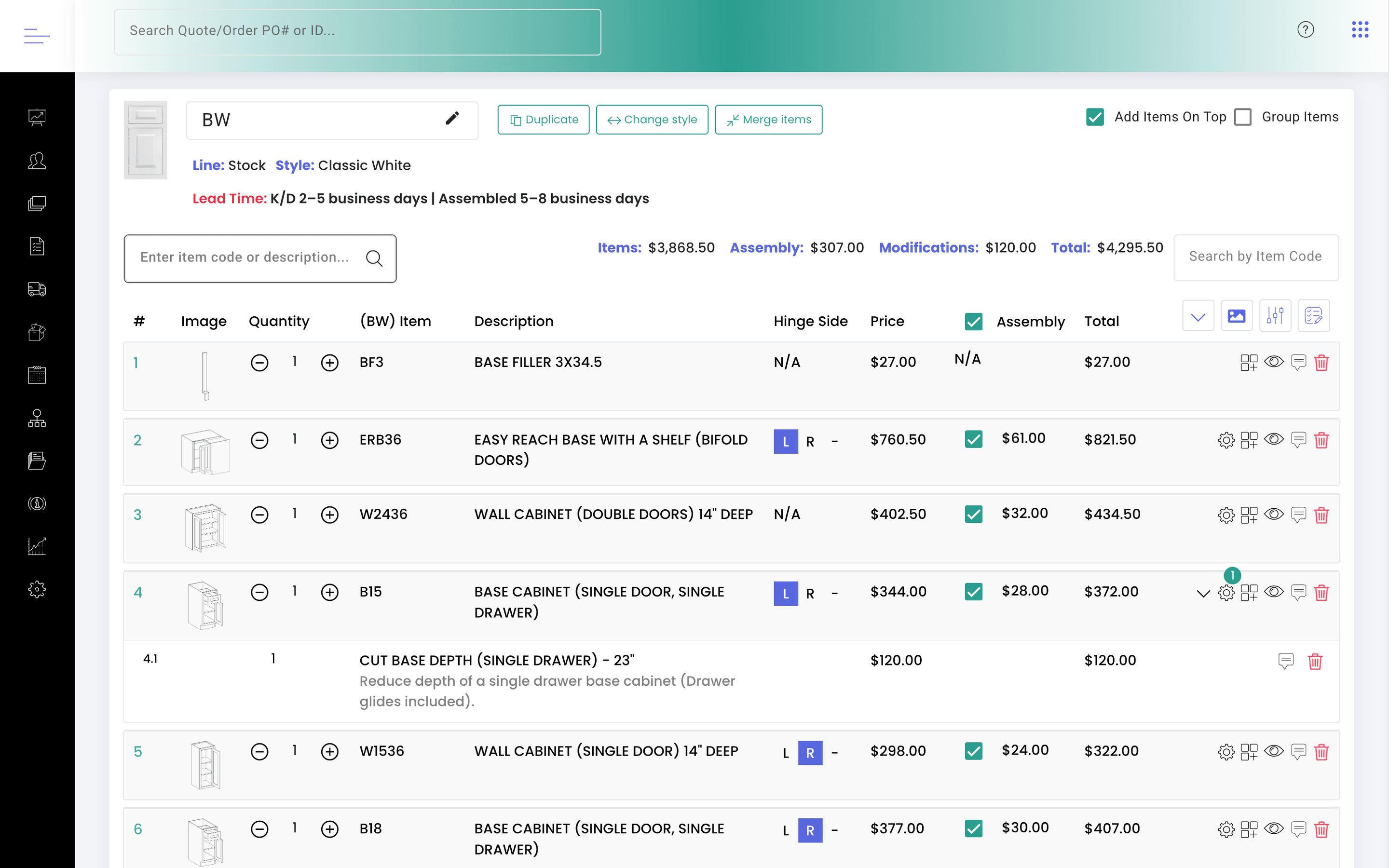
Dealer Portal is a branded quoting and ordering portal for cabinet manufacturers and distributors. Your own team and each of your dealers sign in to their own accounts, see your catalog at the right pricing, configure and submit orders, and every order reaches you as structured data instead of an attachment.
Your catalog goes in once.
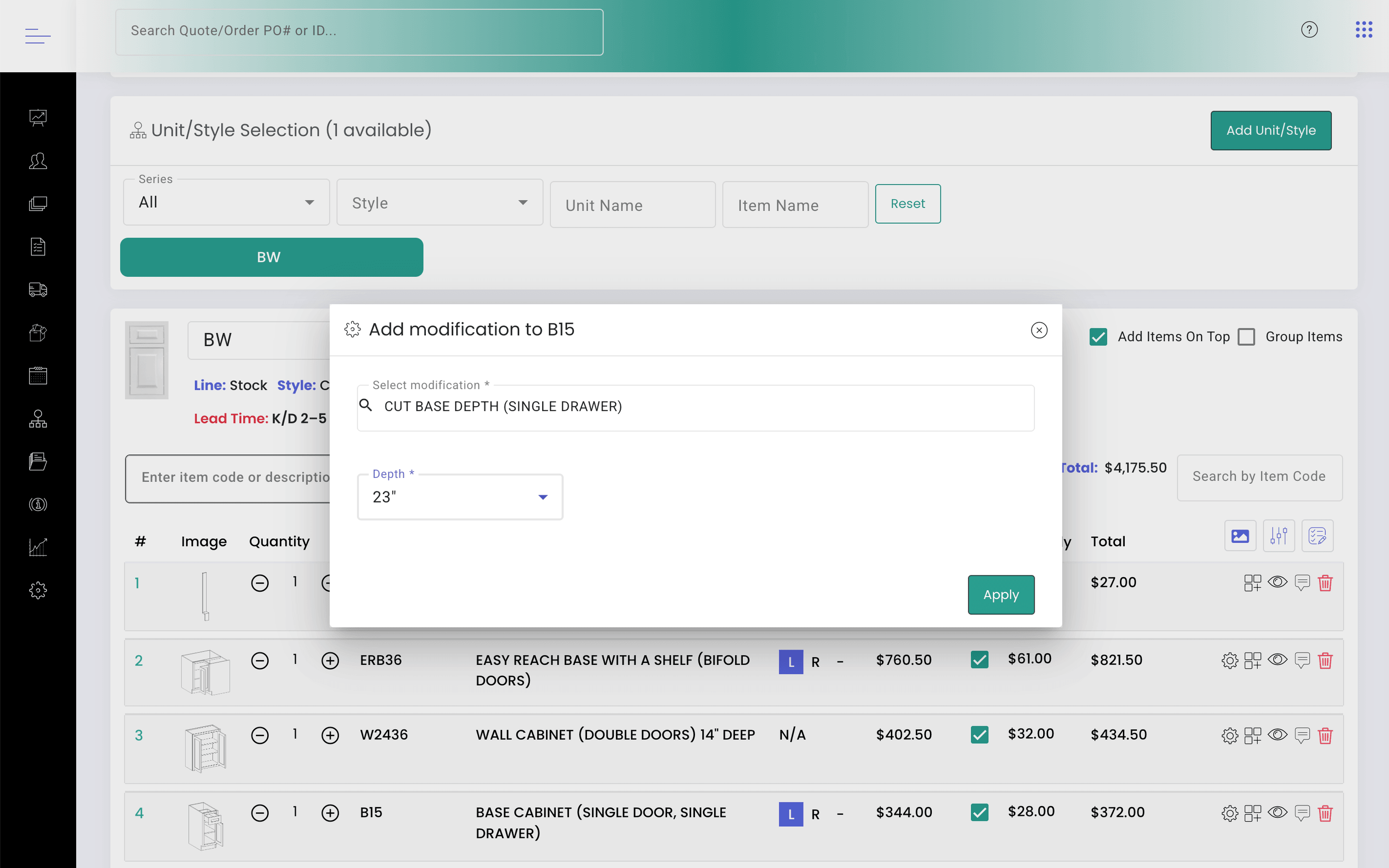
Door styles, finishes, sizes, modifications, accessories and upcharges, held and maintained in one place.Each dealer sees their own price.
Dealer multipliers, price levels and customer-specific rates mean a dealer sees what they pay. Change a price once and it changes everywhere.Your team or the dealer builds the order.
They configure the cabinet, add modifications and accessories, and watch a running total that already includes assembly, upcharges, shipping and tax. A design drawn in Design Flex (formerly 2020 Design) can be imported instead of entered by hand.The order moves into your ERP.
An approved order leaves KitchenDEV as data. Your ERP stays the system of record for accounting and production.
Does it hold up at real volume?
- 100,000+estimates and orders processed since 2018
- 5,000+dealers use Dealer Portal
- $1.35M849 units: a single multi-family project, quoted and managed in the portal
“The integration of this software system with our needs is awesome, and it just eliminates a lot of calls. They won't call for dimensions.”
“I had two training sessions that went over very well this week as far as the feedback about how good our portal is compared to others. I appreciate all you do to make it an excellent tool!”
“Everything's translating over into NetSuite really, really well. I haven't noticed any glitches with the KitchenDEV program at all.”
Built for every desk that touches an order
- Quote at the right price in minutes, in-house or by the dealer
- A sales rep can see exactly what a dealer sees
- Every dealer email, stage update and note kept on the order
- Fewer calls for prices and dimensions
Online payments · premium module
Get paid when the order is placed, on your terms
Dealers pay inside the portal while they order, by card, ACH or check. Payments run through Sola Payments, the processor many cabinet manufacturers and distributors already use. Authorize.net and Stripe are supported too. The merchant account is yours, and so is the rate: KitchenDEV doesn't set it or mark it up.
 Payment partner

- Deposit required 50%$6,240.00
- Card surcharge3%
- Pay by ACHsave 2.5%
Set the terms each dealer works on
Deposit to release.
50% up front, or any percentage you choose, with the balance paid later in the portal.
Net 15 / Net 30.
Dealers on terms order now and pay later. Their terms sit on their account and show on every order.
Card fees passed on.
Add a surcharge on card payments: 2.5%, 3.5% or your own rate.
A discount for paying the easy way.
Reward ACH, check or paid-in-full orders with a discount, and choose whether it applies to delivery.
See all payment terms
Prepaid.
The order isn't released until it's paid in full.
Pickup discount.
Take a set amount off when the dealer collects the order themselves.
Checks without the mail.
The dealer photographs the front and back of the check. You approve it and deposit it as usual.
Dealer credit.
Overpayments and claim credits stay on the dealer's account and can be applied to any order. Credit prints on its own line on the invoice.
And the follow-through
- A Pay button on every order with a balance due, and a pay link you can send.
- An email to you for every payment: amount, date, method, and a link to the order.
- Full payment history on every quote and order.
- Same-day void on card payments.
- Open invoices on your dashboard.
Online payments is a premium module. How pricing works →
What happens after the order is placed?
After the dealer orders, the portal follows the job through to delivery, set up the way your operation already runs.
- 01
Order stages you define.
Each stage can send the dealer a notification email as the order reaches it.
- 02
Requested dates you approve.
Dealers request a delivery date. You set the minimum lead time, then approve the date or move it to fit your schedule.
- 03
Pickups and deliveries on a calendar.
Every scheduled pickup and delivery on one calendar, so the warehouse and the dealer see the same date.
- 04
The documents you already send.
Estimates, orders, invoices, cut lists, packing lists, product stickers and packing labels, generated in your format.
- 05
A message trail per order.
Dealer emails, stage notifications and internal notes, kept with the job rather than in one person's inbox.
- 06
Claims with your rules attached.
Damage, return and replacement claims are filed in the portal. You configure the required photo or video evidence, restocking fees, and what happens to a modified cabinet.
Does it connect to our ERP?
KitchenDEV
- Configurator
- Dealer pricing
- Visibility rules
Your ERP
- Accounting
- Production
- Inventory
Dealer Portal sits on top of the ERP you already run. An ERP has no door-style-and-finish configurator, no modification rules with allowed increments and per-door pricing, and no ordering screen a dealer would use without being trained on it.
KitchenDEV owns the configurator, the dealer multipliers and price levels, and the rules for which product lines, styles and colors each dealer can see. Your ERP owns accounting, production and inventory, and stays the system of record.
Integrations are a premium module, built against your systems:



 Business Central
What moves between the two systems, and in which direction, is scoped with you before anything is built.
How pricing works →How long does it take to go live?
We work to a schedule of about six weeks, and the catalog is the long pole. KitchenDEV builds it with you from your price sheets.
You provide the price sheets and answer questions about how your products are configured. The rest is work KitchenDEV does.
- Provisioningwk 1
- Your instance, domain and branding. Starts right away and does not wait on you.
- Catalog buildwk 1-4
- Series, styles, colors, price levels and parts. Starts on day one.
- Integrationswk 2-4
- Runs alongside the catalog build.
- Training and testingwk 3-5
- Your users, over Zoom, then your own testing.
- Go liveafter
- Domain and email cutover, integrations switched to your live systems.
Related articles
- GuidesWhat are the alternatives to Kitchen365 for cabinet manufacturers and distributors?
- GuidesHow do cabinet manufacturers give each dealer their own pricing online?
- GuidesHow do cabinet manufacturers stop re-keying dealer orders?
- GuidesWhat CPQ software works for cabinet manufacturing?
- GuidesWhat is the best dealer portal software for kitchen cabinet manufacturers?
- GuidesWhat should order entry software do for a cabinet manufacturer?
Questions people ask
A dealer places an order the way they would on any ordering site. The setup work is the catalog and the pricing rules, and KitchenDEV does that with you.
Yes. The dealer exports the design from Design Flex and imports that file into the quote, and the cabinets arrive as priced line items. KitchenDEV imports designs out of Design Flex; it does not build a manufacturer's catalog inside Design Flex.
None of those is a standard import. Each one has to be mapped to your catalog for your instance, so KitchenDEV scopes it with you.
Yes. A vendor user can sign in as a specific dealer, to troubleshoot or to build and review an estimate on that dealer's behalf. Permissions can restrict a rep to their own assigned dealers.
Yes. Your inside sales and customer service team quote and enter orders in the same portal, with the same configurator and pricing rules your dealers use. Orders reach your ERP the same way whoever entered them.
Yes. Start with your own team. When you sign your first dealer, give them a login. The catalog, pricing rules and order flow are already in place.
Both of us. KitchenDEV builds the catalog from your price sheets during onboarding. After go-live, your team can edit products and prices in the admin, or send new price sheets and KitchenDEV loads them. Change a price once and every dealer sees it.
Invite a dealer and they register their own account, or add the dealer and its users yourself in the admin. You set each dealer's pricing and which product lines, styles and finishes they can see.
KitchenDEV hosts and runs it, so there's nothing to install on your servers. User roles and permissions control what your staff, sales reps and dealers can see and do.
See it from both sides
A working portal, walked end to end: a dealer configuring and submitting an order, and the same order arriving on your side.