How can a cabinet manufacturer manage new dealer applications online?
A cabinet manufacturer can take new dealer signups on its own online form, with documents attached, and review every applicant in one list in KitchenDEV.
 Eric E. Yildiz3 min read
A cabinet manufacturer manages new dealer applications online by putting its own application form on its website, collecting the dealer's documents with the form, and reviewing every applicant in one shared list. KitchenDEV's Dealer Application Management does that for cabinet manufacturers and distributors, from the form a new dealer fills in to the approval decision.
Dealer Application Management is KitchenDEV's online application form and review list for cabinet manufacturers and distributors that sign up new dealers.
Why are dealer applications hard to track by email?#
Dealer applications are hard to track by email because the pieces arrive separately. The application comes in as a PDF, the resale certificate or credit application comes in another message, and the review status lives in a spreadsheet. KitchenDEV's Dealer Application Management keeps each application and its documents in one place, so the dealer support team works from one list. The screens are on the page about new dealer signups in one review list.
What should an online dealer application collect?#
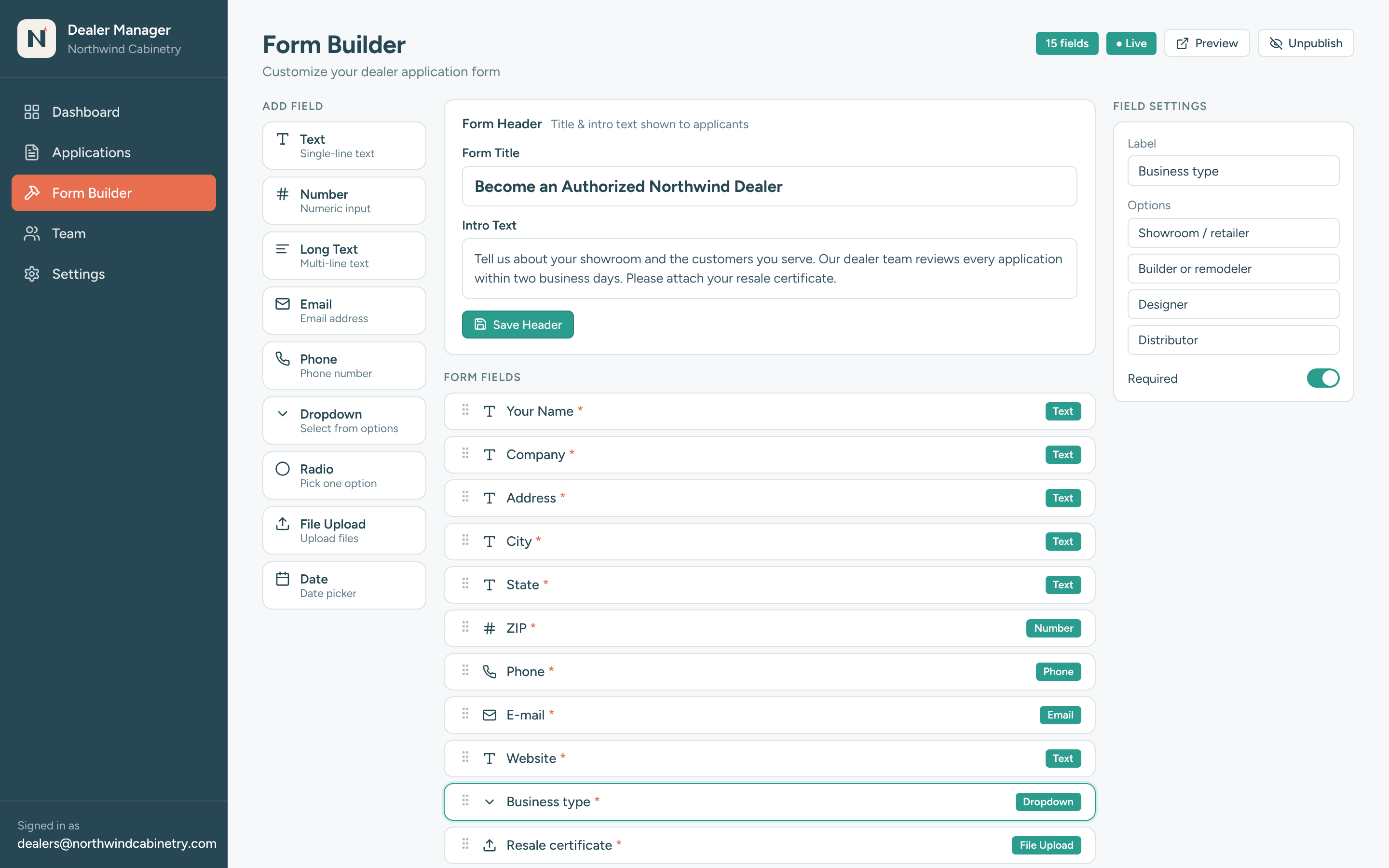
An online dealer application should collect everything the manufacturer needs to approve a dealer, in one submission. The manufacturer builds the form in KitchenDEV's Dealer Application Management and changes it whenever it needs to, without waiting on KitchenDEV. The fields can cover:
- Business and contact details for the dealer's company.
- Financial information needed before an account opens.
- Territory, where the dealer sells.
- Documents such as resale certificates, credit applications and business licenses, uploaded with the application.
The form can be embedded on the manufacturer's own website, or hosted on a separate branded link and subdomain.
How does a dealer support team review each applicant?#
A dealer support team reviews applicants in KitchenDEV's Dealer Application Management from a pipeline view or a searchable table. Each application sits in one of three fixed stages: Under Review, Approved or Rejected.
- An owner for every applicant. Each applicant is assigned to one staff member for review and follow-up.
- Private notes. Staff add timestamped notes that the applicant never sees.
- Corrections during review. Authorized staff can correct or update the submitted information before a decision.
What happens after a dealer is approved?#
KitchenDEV's Dealer Application Management is sold on its own, with its own user accounts, and does not require any other KitchenDEV product. A manufacturer that also uses KitchenDEV's Dealer Portal & Order Automation can send an approved applicant into the Dealer Portal with one click. KitchenDEV then creates the dealer account, carries the application information across and invites the dealer to create a username and password. What the new dealer does next, from pricing to ordering, is covered in what a cabinet dealer portal should do. Without the Dealer Portal, there is no one-click account step.
FAQ#
No. KitchenDEV's Dealer Application Management is sold on its own, with its own user accounts. With the Dealer Portal, an approved dealer moves into Dealer Portal onboarding in one click.
No. Notes in KitchenDEV's Dealer Application Management are private and timestamped, and applicants cannot see them.
The dealer application form in KitchenDEV's Dealer Application Management is embedded on the manufacturer's own website or hosted on a branded link and subdomain.
See the four steps from form to approved dealer on the Dealer Application Management page, or book a demo and bring the application you use today.