How does a showroom price a cabinet job to hit its target margin?
A showroom prices a cabinet job to a target margin by dividing the job's total cost by one minus the margin. Work it out with your own numbers.
 Eric E. YildizUpdated 5 min read
A showroom prices a cabinet job to a target margin by adding up every cost on the job (the vendor's cabinet cost, vendor fees such as a tariff or handling fee, assembly, freight and installation) and dividing that total by one minus the target margin. KitchenDEV's Kitchen & Bath Retailer Suite does that arithmetic on every proposal and shows the cost, the retail price and the gross profit before the quote goes to the customer.
The selling price of a cabinet job at a target margin is the job's total cost divided by one minus the target margin, so a 40% target margin means dividing the total cost by 0.6.
What costs go into a cabinet job?#
A cabinet job carries more cost than the vendor's price for the boxes. Each line below belongs in the total before any margin is applied, and each one has a place in kitchen cabinet estimating software built for showrooms:
- Vendor cabinet cost. The price the vendor charges the showroom, from the vendor's current price sheet. KitchenDEV's Kitchen & Bath Retailer Suite sets a cost for each catalog, and the cost can be overridden at the style level.
- Vendor fees. A tariff or a handling fee, usually a percentage of the vendor cost. In KitchenDEV's Kitchen & Bath Retailer Suite, a vendor fee is added by label and percentage, applied to the cost, and the retail price and margin are recalculated from the new cost.
- Assembly. KitchenDEV's Kitchen & Bath Retailer Suite shows an assembly fee on each cabinet line that can be edited in place. A showroom can also switch on a per-location labor charge that replaces standard assembly pricing.
- Freight and delivery. KitchenDEV's Kitchen & Bath Retailer Suite can calculate freight from freight charge groups set up by market, each with a per-box charge, using the box count on the proposal.
- Installation and other services. Site measurements, design services, delivery and installation can be set up once as labor and service items, with their own pricing and tax rules, and included or left off each proposal.
- Everything else on the job. Countertops, hardware, sinks and other products on the same proposal carry their own cost.
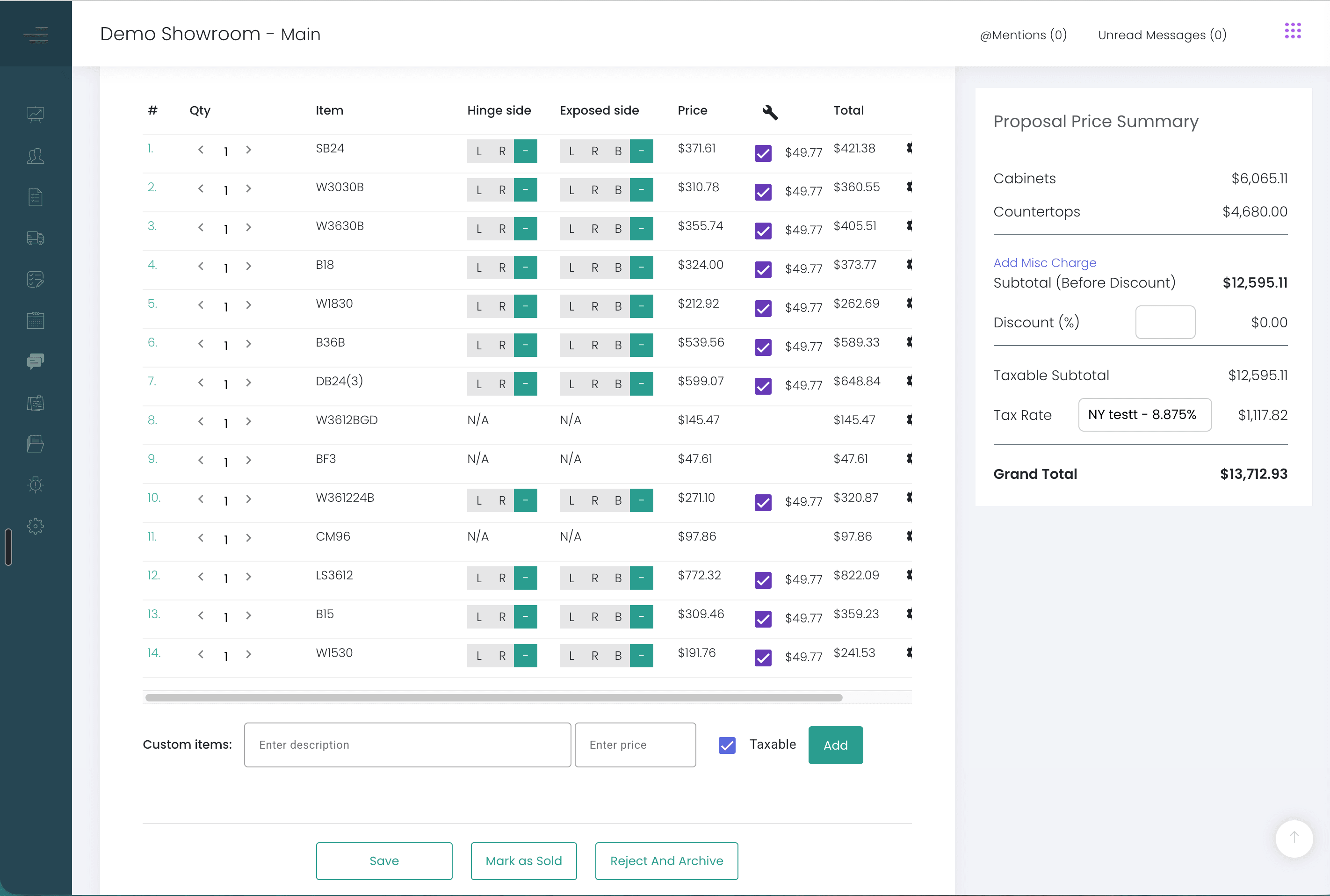
Sales tax sits outside this arithmetic. Margin is measured on the pre-tax selling price.
Why is a 25% margin not the same as a 1.25 multiplier?#
A 25% margin means the showroom keeps a quarter of the selling price, so the selling price is the cost divided by 0.75, about 1.33 times the cost. Multiplying cost by 1.25 adds 25% of the cost, and the margin on that price is only 20%. The gap grows as the target goes up: a 40% margin needs about 1.67 times the cost, and 1.40 times the cost gives a margin of about 29%.
On one KitchenDEV onboarding call a showroom team said "we want to sell it at a 25% margin… so would it be 1.25?" On another, a showroom user read the default cost multiplier of 1.000 as "1%" three times in one call. Cabinet showrooms describe their pricing in margin, and a price built as a percentage added to cost lands below the margin the owner had in mind.
How do you work out the selling price of a cabinet job?#
- Add the vendor cost of every cabinet on the job.
- Add the vendor fees, as a percentage of that vendor cost.
- Add assembly, freight, installation and any other cost on the job. The result is the total job cost.
- Divide the total job cost by one minus the target margin. For a 35% target, divide by 0.65. The result is the pre-tax selling price.
- Check the result. Gross profit is the selling price minus the total job cost, and the margin is the gross profit divided by the selling price.
The calculator below runs those five steps on your own numbers. Nothing is filled in until you type.
Cabinet job price and margin calculator
Enter the costs of one job and the margin you want to keep. The selling price, gross profit and margin update as you type.
What the vendor charges the showroom for the cabinets on this job.
A percentage of the vendor cost. Leave empty if none.
Countertops, hardware, services. Leave empty if none.
Your share of the pre-tax selling price.
Enter the vendor cost and a target margin to see the selling price.
- Total job cost
- –
- Selling price before tax
- –
- Gross profit
- –
- Margin
- –
- Selling price ÷ total cost
- –
Where does KitchenDEV's Kitchen & Bath Retailer Suite show the margin on a proposal?#
KitchenDEV's Kitchen & Bath Retailer Suite calculates gross profit on each proposal as the pre-tax total minus cost, and the price summary lists only the categories that are on that proposal. Each catalog carries a cost and a standard retail multiplier, customer types such as homeowners, contractors and builders can have their own pricing, and one proposal can take a custom multiplier for one job without changing the catalog or the customer's standard pricing. A contractor tier, a standing discount per contractor and a limited contractor login are covered in cabinet pricing software for contractors. How cost, retail price and profit sit side by side on each proposal is covered in seeing the margin on every showroom quote.
What still takes work?#
- Costs that are actually set. The margin on screen is only as right as the costs behind it. One showroom on record blamed its margins on the software and found its cost and retail multipliers had never been set after onboarding.
- Assembly rules that match the vendor. On one KitchenDEV onboarding, an assembly rule configured at 14% was caught against a vendor contract that said 10%, on the first day of use.
- Current price sheets. When a vendor issues a new price sheet, the showroom sends it to KitchenDEV, and KitchenDEV generally applies the update within one week. The vendors covered are listed with the cabinet catalogs KitchenDEV builds.
FAQ#
The selling price at a target margin is the total job cost divided by one minus the target margin, written as a decimal. A job priced for a 30% margin sells for its total cost divided by 0.7.
Cabinet showrooms that talk to KitchenDEV describe their pricing in margin, the share of the selling price they keep. A percentage added to cost gives a lower margin than the same percentage read as margin, so a showroom should decide which one its prices mean before setting up any pricing tool.
Yes. KitchenDEV's Kitchen & Bath Retailer Suite adds a vendor fee such as a tariff or handling fee to the vendor's cost as a percentage, and calculates freight from market-based freight groups with a per-box charge, so the margin on the proposal is worked out from the full cost.
See cost, retail price and gross profit on a real proposal on the Kitchen & Bath Retailer Suite page, or book a demo with a recent job you want to check.