Is there a B2B ordering portal for semi-custom cabinet manufacturers that works with our ERP?
KitchenDEV's Dealer Portal is a B2B cabinet ordering portal that exports dealer orders to NetSuite, Acumatica, QuickBooks, Business Central and Odoo.
 Eric E. Yildiz4 min read
Yes. KitchenDEV's Dealer Portal & Order Automation is a B2B ordering portal for stock and semi-custom cabinet manufacturers and distributors, and KitchenDEV's Dealer Portal exports approved dealer orders to the ERP the manufacturer already runs. KitchenDEV's Dealer Portal has shipped order exports to QuickBooks Desktop, Microsoft Dynamics 365 Business Central and Odoo, and the manufacturer's ERP stays the system of record.
KitchenDEV's Dealer Portal is a branded B2B website where a manufacturer's dealers price the manufacturer's catalog at their own pricing, build estimates and submit orders, which the manufacturer then exports to its ERP or accounting system.
What does an ERP connection change for dealer orders?#
Without a portal, a dealer emails or faxes the order and someone at the manufacturer types the order into the ERP a second time, which is where the errors come in. With KitchenDEV's Dealer Portal, the dealer submits the order online, the manufacturer's team reviews and approves the order, and KitchenDEV's Dealer Portal exports the approved order to the ERP. The whole path from email to export is laid out in how cabinet manufacturers stop re-keying dealer orders.
Which ERP systems does KitchenDEV's Dealer Portal connect to?#
- NetSuite. KitchenDEV's Dealer Portal exports an approved dealer order to NetSuite.
- Acumatica. KitchenDEV's Dealer Portal exports an approved dealer order to Acumatica as a sales order.
- QuickBooks Desktop. KitchenDEV's Dealer Portal exports an order to QuickBooks Desktop as an invoice made of summarized accounting lines for cabinets, delivery, indoor service, miscellaneous charges and discount, under QuickBooks item codes the manufacturer configures. The QuickBooks transaction ID and an "exported" indicator then appear on the order. The manufacturer can also pull the QuickBooks Desktop customer list and see from the settings screen whether the connector is running.
- Microsoft Dynamics 365 Business Central. KitchenDEV's Dealer Portal sends the item code to Business Central when an order is exported. The Business Central export can also carry a 4-character code for each cabinet's door style, carcass construction, finish and drawer type.
- Odoo. KitchenDEV's Dealer Portal exports an order to Odoo as a sales order. Items pulled from Odoo bring their prices with them, and KitchenDEV's Dealer Portal can pull Odoo stock status (in stock, low or backorder) every hour and show the status to dealers while they search the catalog.
The order page in KitchenDEV's Dealer Portal shows the external invoice number from QuickBooks or Odoo, and a linked Odoo sales order opens in one click. Dealer email templates can include the invoice number from QuickBooks, Odoo or Acumatica.
KitchenDEV's Dealer Portal can also download orders as a JSON file, with a unique file name for each download and the PO number on every order. A documented REST API is available too: the manufacturer generates API keys, and the first endpoints return the dealer list and a single dealer by ID.
ERP and accounting integrations are an optional premium module of KitchenDEV's Dealer Portal. What each integration sends depends on the manufacturer's system and how the integration is set up.
Does KitchenDEV's Dealer Portal handle semi-custom cabinet orders?#
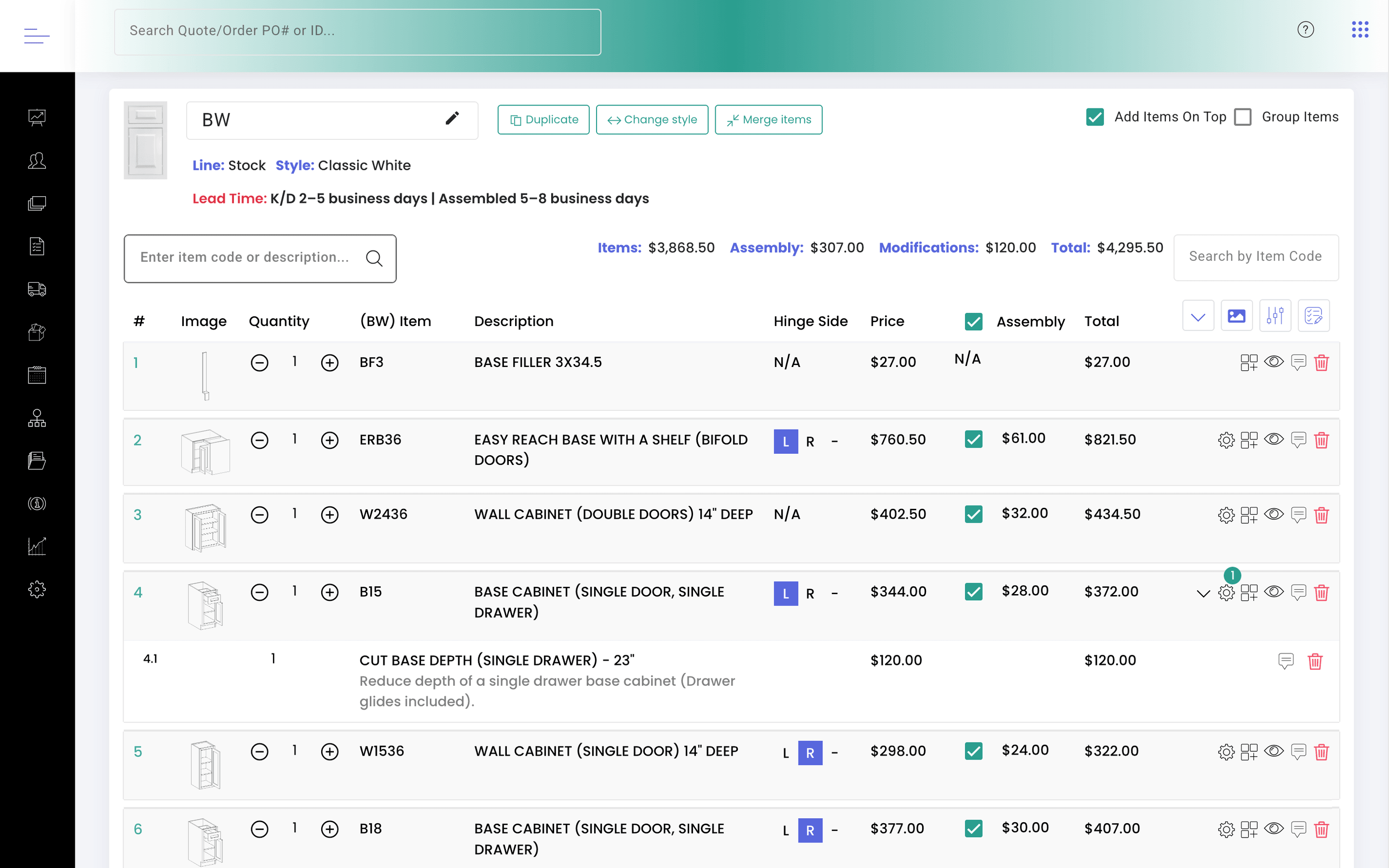
KitchenDEV's Dealer Portal works best for semi-custom and stock lines built on standard cabinet codes, such as a 0942 wall cabinet, with options and modifications added on top. Dealers set options, modifications, accessories and assembly on each cabinet, and KitchenDEV's Dealer Portal prices every line at that dealer's multiplier or price level, as explained in how to give each dealer their own pricing online. A fully custom line where every cabinet is sized freely is a weaker fit, because KitchenDEV's Dealer Portal does not offer free-dimension entry.
Does a manufacturer have to replace its ERP?#
No. KitchenDEV's Dealer Portal runs next to the ERP. KitchenDEV holds the catalog, the dealer pricing and the ordering screens, and the ERP keeps accounting, production and inventory. The features on each side are listed on the Dealer Portal & Order Automation page.
A manufacturer whose orders start as Design Flex (formerly 2020 Design) files, with no dealer portal involved, has a different question, answered in how to get Design Flex orders into an ERP automatically.
FAQ#
Yes. KitchenDEV's Dealer Portal exports dealer orders to QuickBooks Desktop as invoices under QuickBooks item codes the manufacturer configures, and shows the QuickBooks transaction ID on each exported order.
With the Odoo integration, KitchenDEV's Dealer Portal pulls stock status from Odoo every hour and shows dealers whether an item is in stock, low or on backorder. Inventory from other systems depends on the connected system and the scope of the setup.
No. ERP and accounting integrations are an optional premium module of KitchenDEV's Dealer Portal, added on top of the base portal.
Yes. A manufacturer using KitchenDEV's Dealer Portal can generate API keys for a documented, rate-limited REST API whose first endpoints return the dealer list and a single dealer by ID.
See a dealer order go from estimate to ERP export in a demo.